The contents of this rulebook are continuously updated through playtesting. Since game balance adjustments and improvements are made, please regularly check for the latest rules.
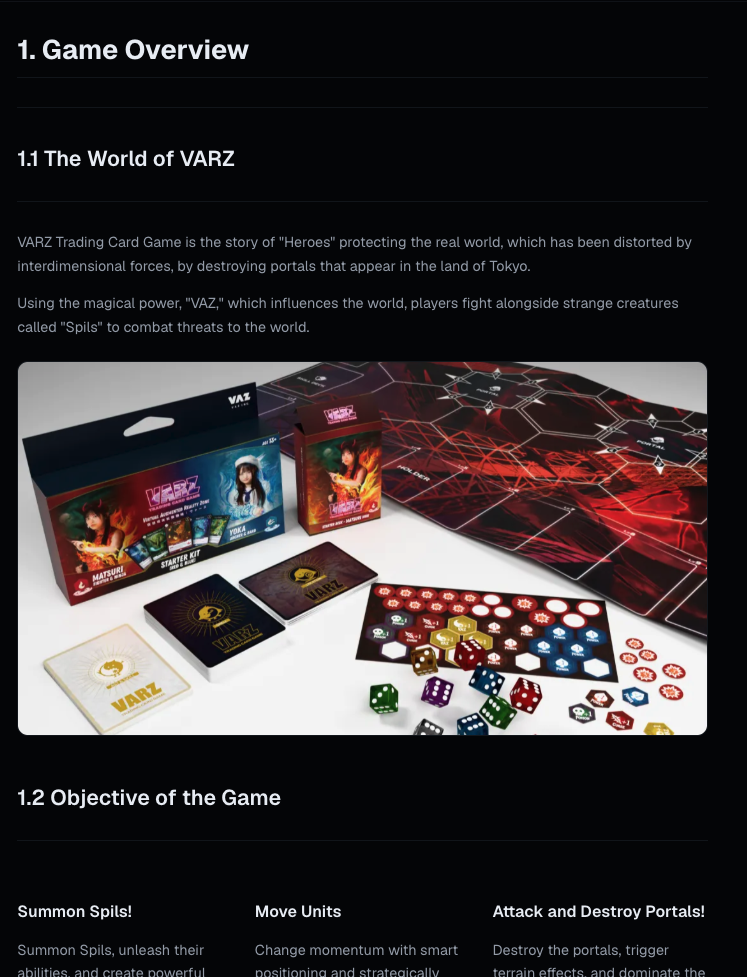
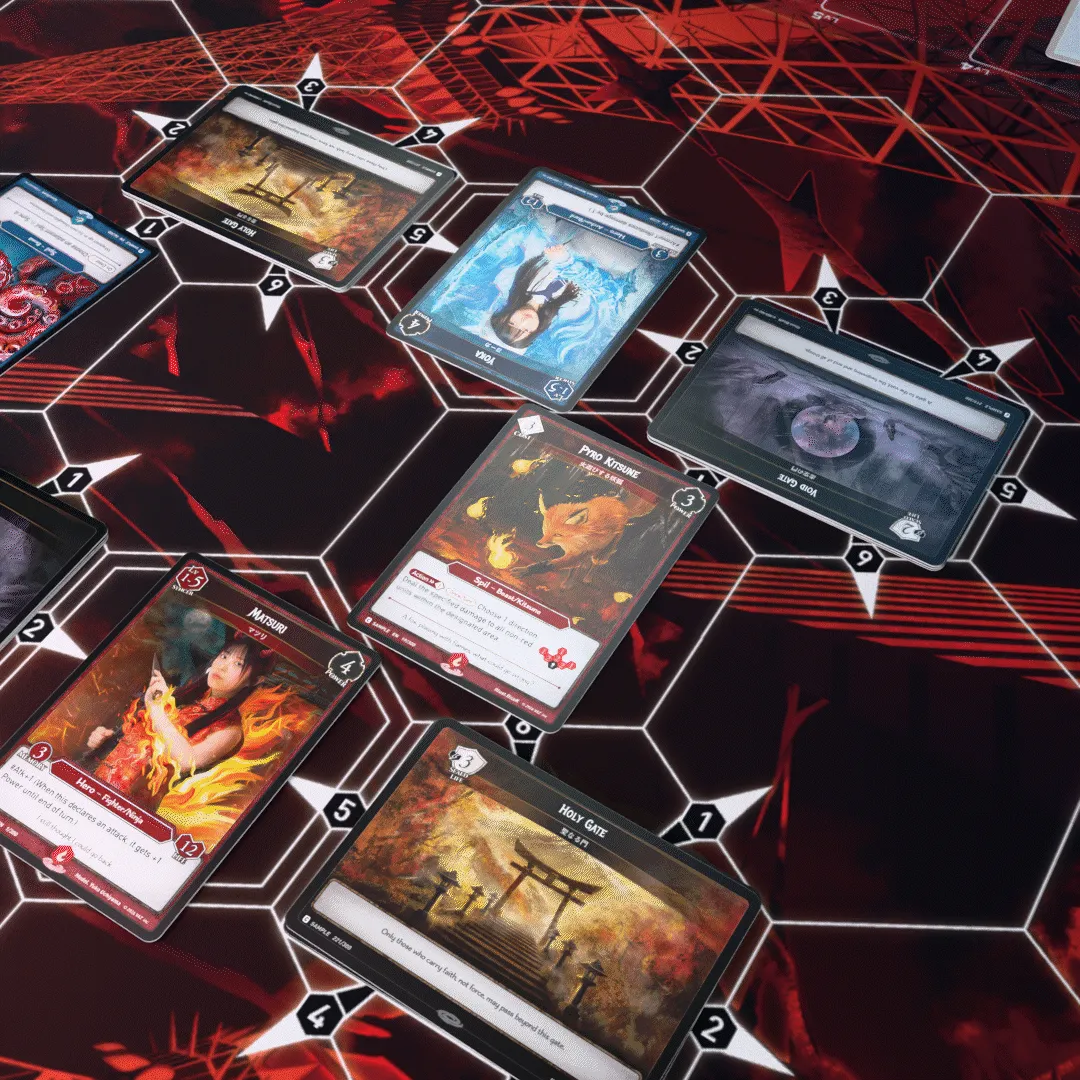
VARZ Trading Card Game is the story of "Heroes" protecting the real world, which has been distorted by interdimensional forces, by destroying portals that appear in the land of Tokyo.
Using the magical power, "VAZ," which influences the world, players fight alongside strange creatures called "Spils" to combat threats to the world.
1.2 Objective of the Game
Summon Spils!
Summon Spils, unleash their abilities, and create powerful synergies!
Move Units
Change momentum with smart positioning and strategically attack, defend, and reposition.
Attack and Destroy Portals!
Destroy the portals, trigger terrain effects, and dominate the field!
1.3 Victory Conditions
There are two victory conditions, and one further way to lose, described below. The player who first fulfills one of these conditions wins the game.
❶ Reduce the opponent's life to 0.
Each player loses the game when their life reaches 0.
The starting life is 12 points.
❷Destroy all portals on any of your opponent's lands.
Each player loses the game when a portal count on one of their lands reaches 0.
At the start of the game, each land has 4 portals set up.
💡
A player loses the game when they are required to draw a card and cannot. Running out of cards is not itself a loss: a player may continue with an empty deck until something asks them to draw.
A player’s Life cannot exceed their Hero’s printed Life value.
1.4 Ways to Achieve Victory
The opponent's life can be reduced through spells or combat by either dealing direct damage to the opponent's Hero or destroying their portals.
❶Destroy the opponent's portals.
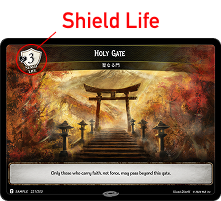
★ Portals are destroyed and put into its owner's Ruins when they receive damage equal to or greater than their Sheld Life.
★ If a portal is destroyed, damage equal to its Shield Life is dealt to the owner's life.
★ Once a portal is destroyed, the next portal is revealed.
(A destroyed Portal is not replaced immediately. The next Portal is revealed after pending effects and Slash timing are finished.)
❷Attack the opponent's Hero directly.
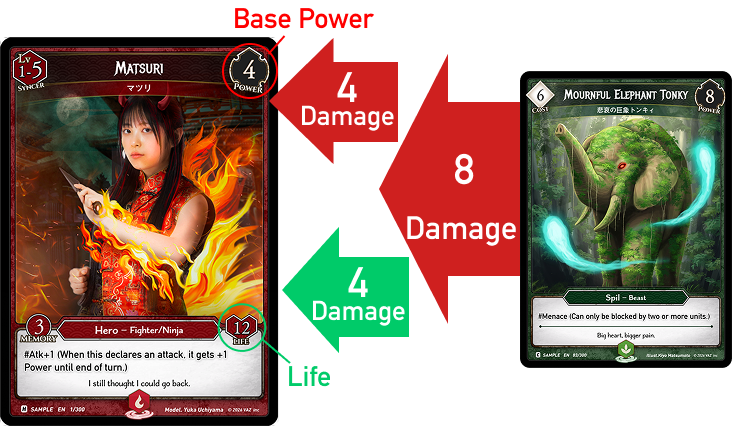
Heroes that receive damage reducing their power to 0 or below will have the excess damage dealt to their life.
For example, if a hero with a base power of 4 receives 7 damage, the hero’s power will drop to 0, and 3 points of life will be deducted.
2. Game Setup and Formats
2.1 What You Need
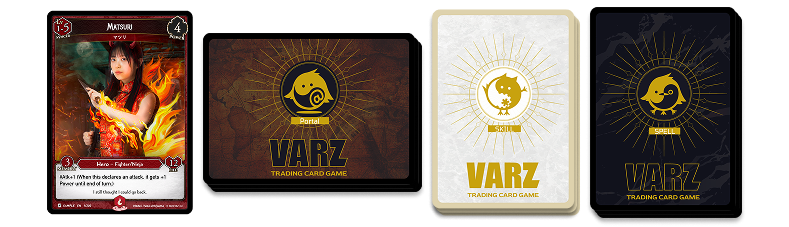
VARZ TCG is played using Hero cards and three types of decks.
🃏
Required Items
Hero Card ×1
Deck: 30 cards total (up to 3 copies each)
Portal Deck: 8 cards total. A Portal with an effect: 1 copy. A basic gate with no effect: up to 4 copies. The total Shield Life of the 8 must be exactly 20.
Skill Deck: 9 cards total (Only one copy of each Skill card other than VAZ Skills.)
[Total: 48 cards]
Recommended Items
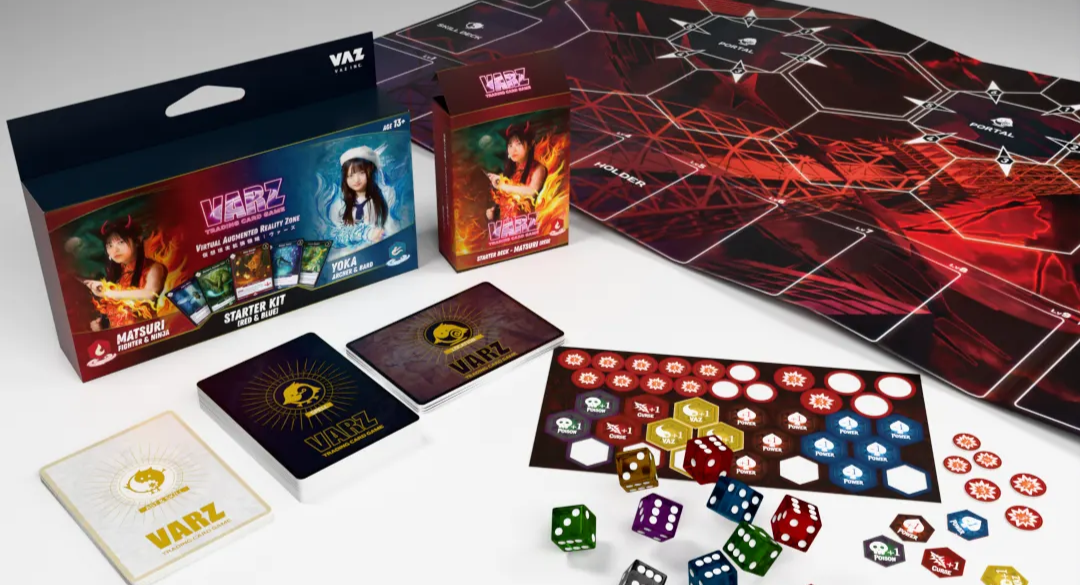
Markers and dice are used to track the status of each card.
Markers and damage chips are removed at the end of your turn.
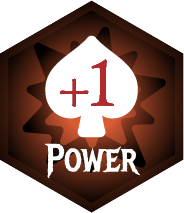
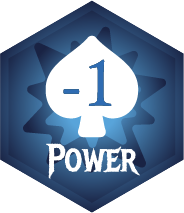
Power +1 /-1 Marker
Power+1 counters increase current Power by 1.
They do not change base Power unless a card says otherwise.
Damage chips record damage taken and are removed at end of turn. They are not counters.
Power +1 Counter
Power+1 counters increase current Power by 1.
They do not change base Power unless a card says otherwise.
Damage chips record damage taken and are removed at end of turn. They are not counters.
Life Counter
Use this to keep track of the player's life. Please use a 12-sided die or an app.
2.2 Selecting a Game Format
Constructed Formats
Depending on the desired style, select a constructed format.
❶Standard
This is a competitive format in which players build their Portal Deck using up to two Portal cards with effects.
At the start of the game, players may arrange the order of their Portal Deck freely.
❷Pioneer
This is a party-play format in which players build their Portal Decks using randomly selected Portal cards brought by all players.
At the start of the game, the order of each Portal Deck is not chosen by the player and is revealed at random.
Playmat Selection
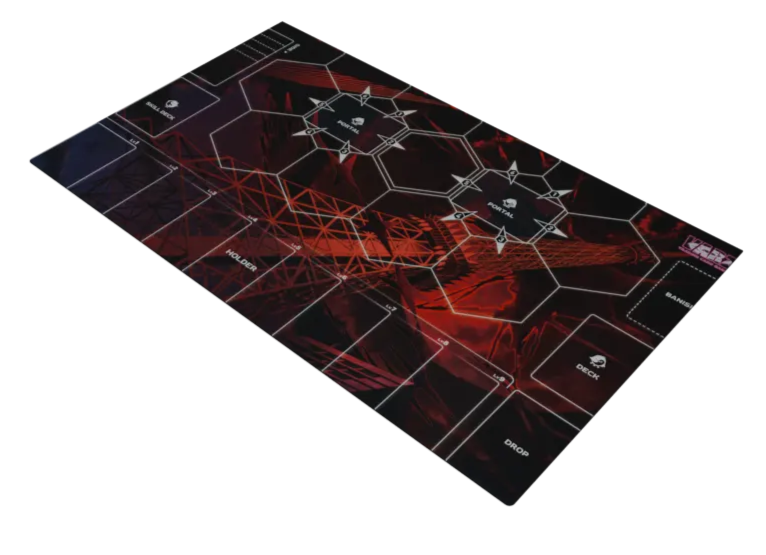
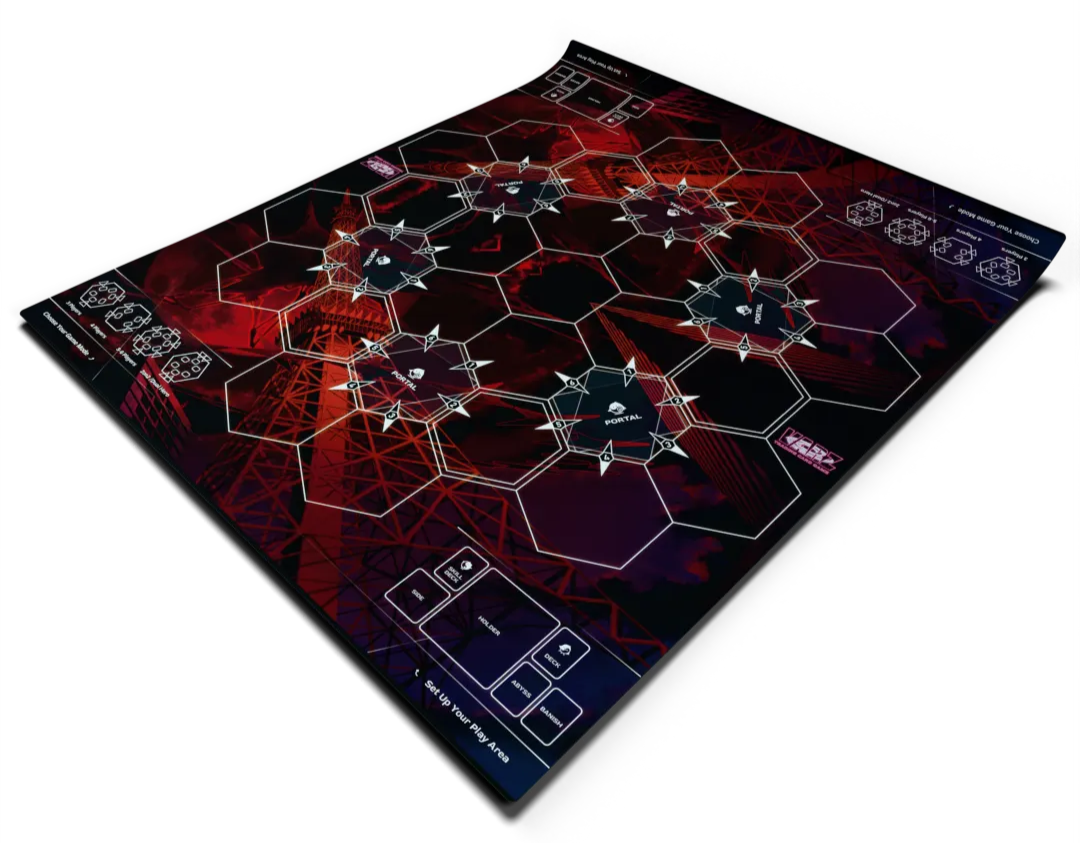
Changing the playmat allows for different numbers of players and formats to be accommodated.
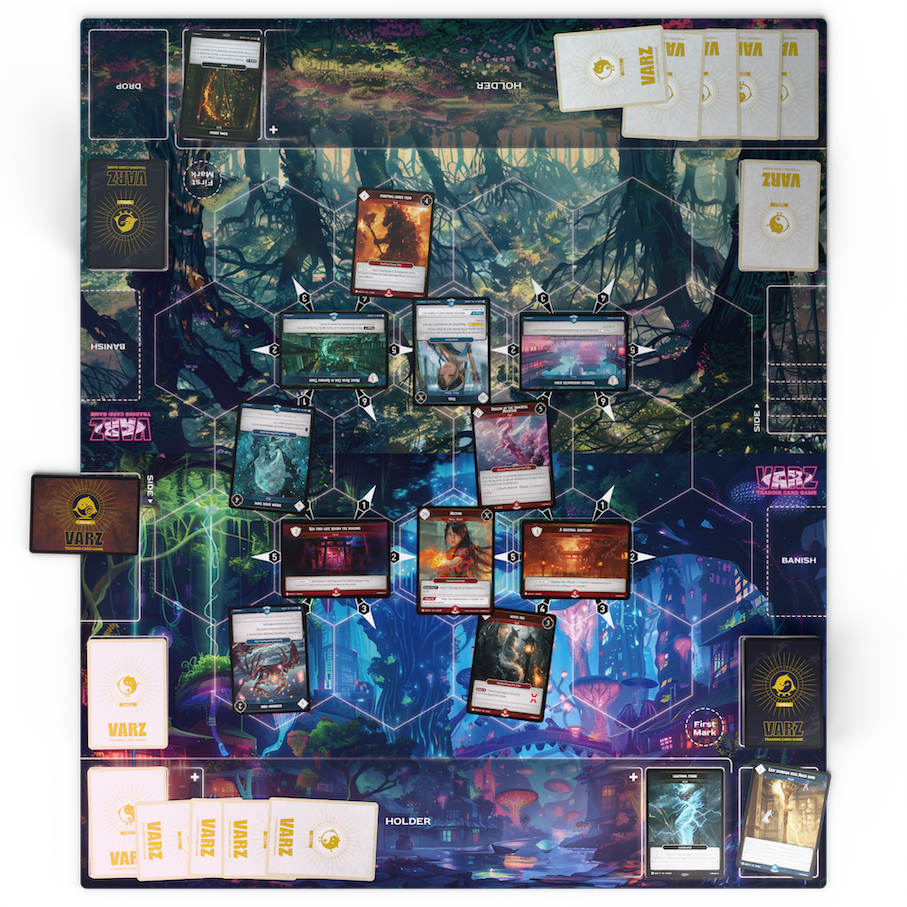
The standard playmat with 4 portals used for normal play.
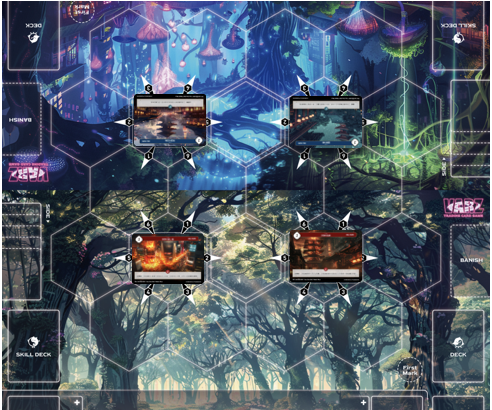
A playmat with 6 portals used for multiplayer games.
Multiplayer Rules
In 3-player mode, each player places two Portal Decks (4 cards each): one in front of them and one to their left. In 4- to 6-player modes, each player places one Portal Deck directly in front of them.
⚠️Before the game begins, the player who is not the first active player puts the top Skill card of their skill deck face down into their Holder. This card is called an initial Holder Skill.
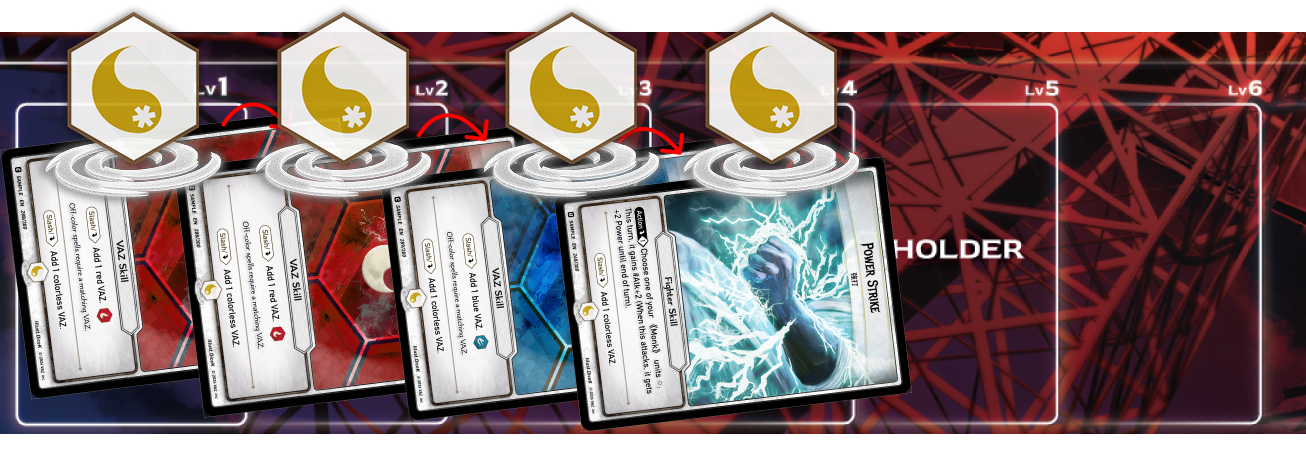
⚠️During each Level Up Phase, the active player places two Skill cards from the top of their skill deck face up into their Holder, unless a rule or format says otherwise.
⚠️ The game proceeds clockwise starting from the first player.
⚠️ Normally, the first player does not draw a card, but in multiplayer games, they can draw.
3 Players Mode
4 Players Mode
5-6 Players Mode
2v2 Team Mode / Double Hero Mode
Each player or team places three Portal Decks (3 cards each)
After deciding which team goes first,
each team selects their starting player.
⚠️The turn order proceeds as follows:
First Team's first player → Second Team's first player → First Team's second player → Second Team's second player,
⚠️A player's life total is the sum of the life totals of all their heroes.
2.3 Game Start
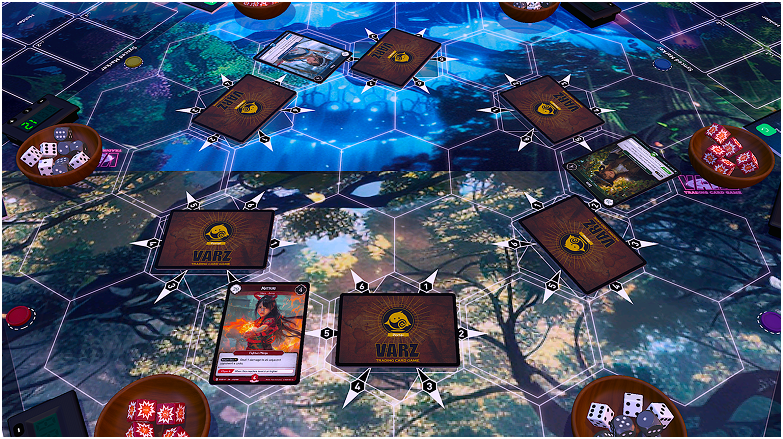
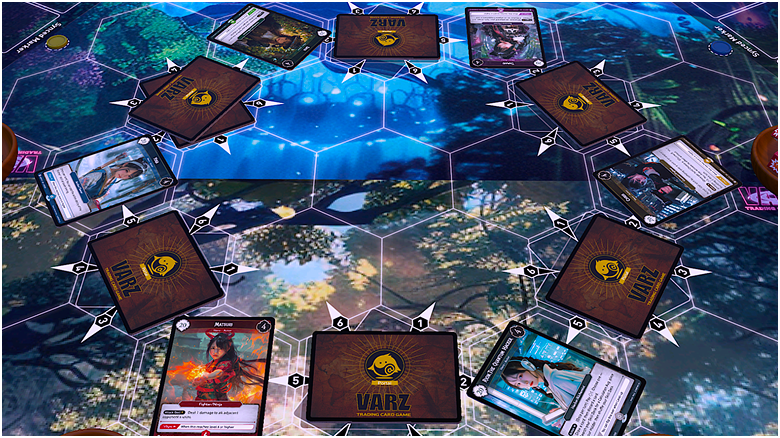
Place your Hero face up on the Start Hex and set your Life counter to match the Hero’s total Life.
(The side labeled “Syncer” is placed face up.)
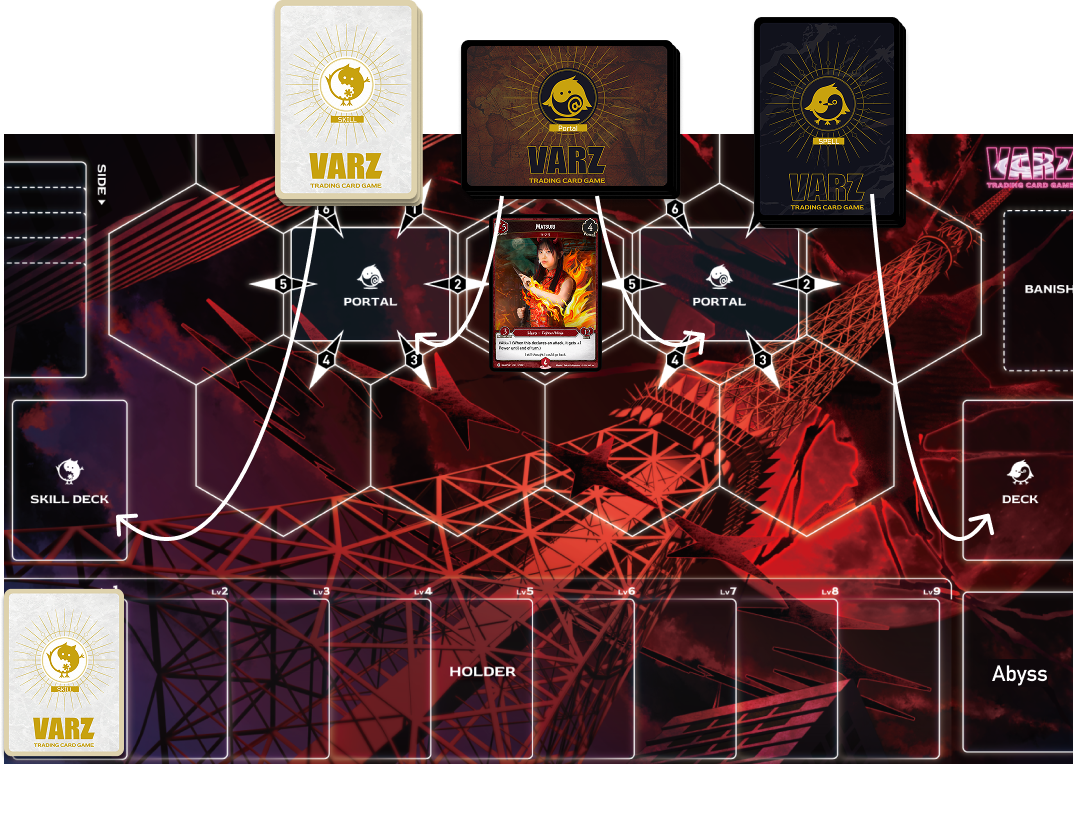
Thoroughly shuffle your Deck and Skill Deck, then place each in its designated area.
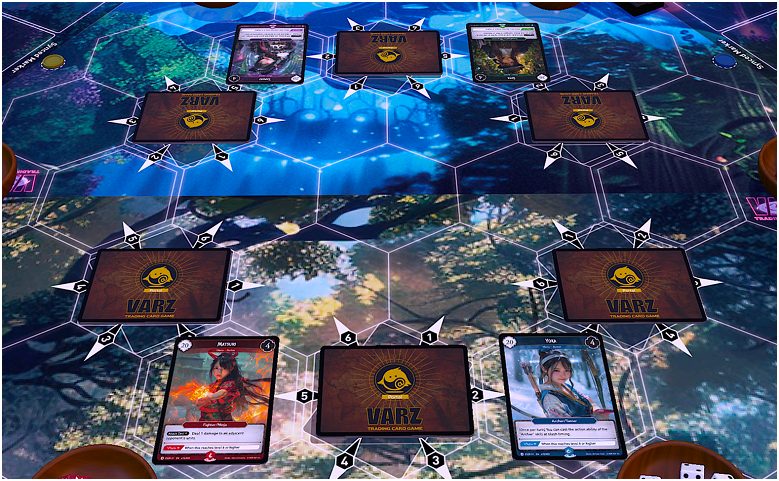
Arrange your Portal Deck in any order, then divide it into two equal stacks and place them on the center hex of each land on your side of the field.
Determine the first player by rolling a die. After that, the second player places one Skill card face down into the Holder.
Draw five cards from your Deck.
Once only, you may choose any number of cards from your hand and return them to your Deck.Shuffle your Deck, then draw the same number of cards that were returned.
Reveal the top Portal card of each Portal stack and begin the game.
Portal “on reveal” effects do not trigger at the start of the game.
3. Cards and Deck Construction
3-1. Card Information
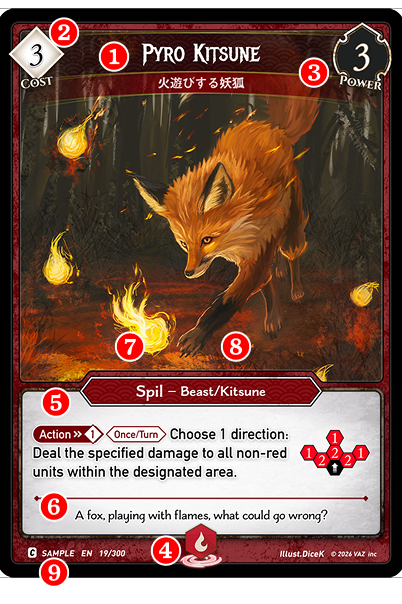
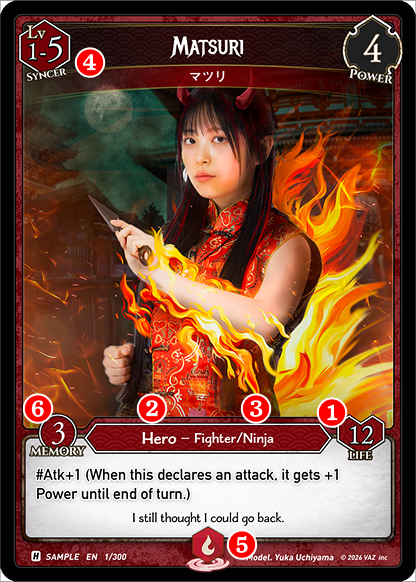
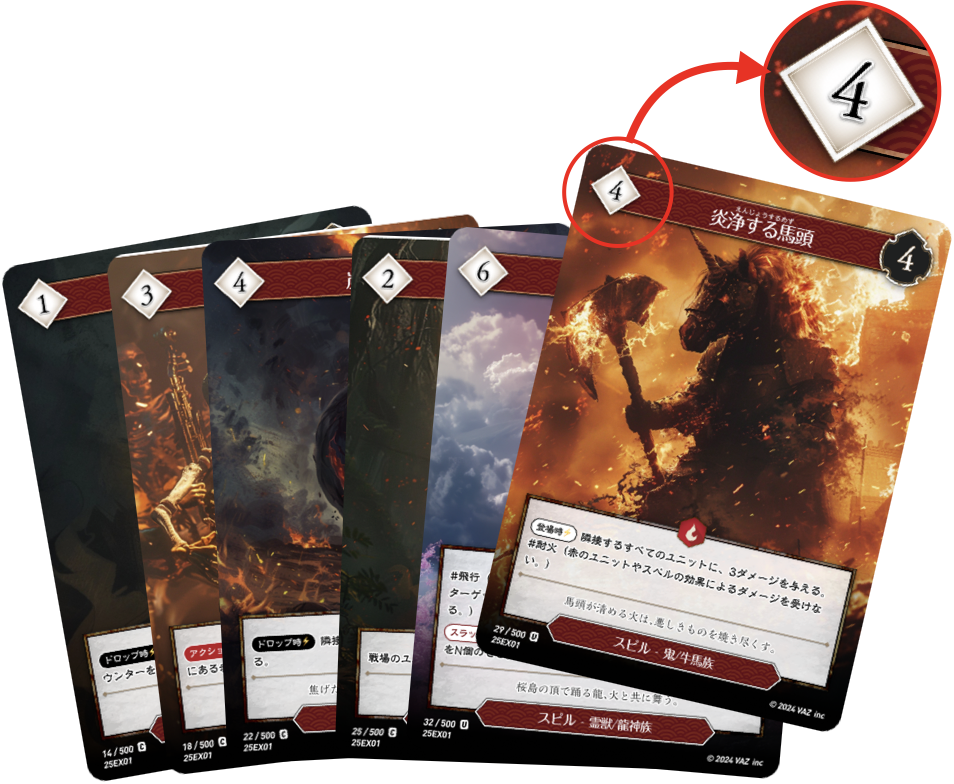
❶Card Name
The name of the card.
❷VAZ Cost
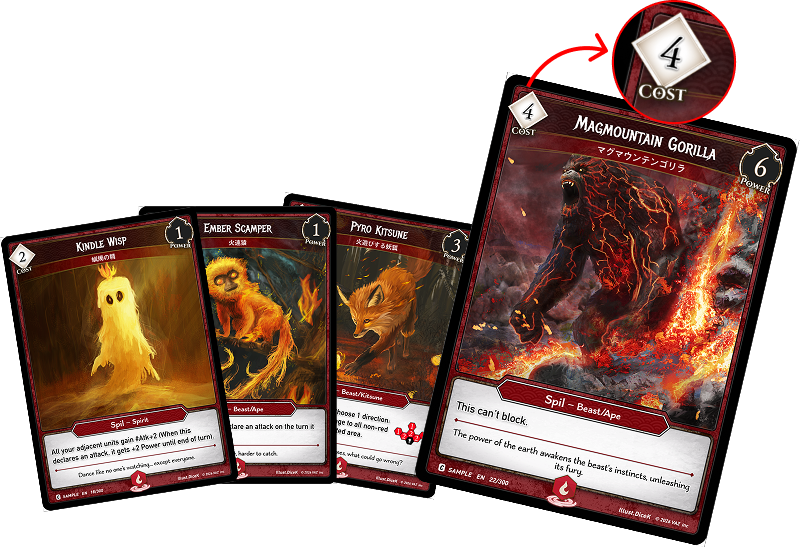
The required VAZ cost to cast this spell.
❸Base Power
The power value indicated on the card.
❹Color Type
This indicates the color type of the card.
❺Card Text
The effect of the card.
❻Flavor Text
This is additional lore or background about the card, not affecting gameplay.
❼Card Type
The type of card (e.g., Hero, Spil, Command, Slash).
❽Class Attributes
The class of the card.
❾Card Information
This section includes the rarity, card number, expansion name, and model name.
Ability Labels
Abilities written in the form “Trigger (condition): effect.”
When the stated condition is met, the effect triggers.
Attack Declaration:
An ability that triggers when an attack is declared.
On Drop:
An ability that triggers when the specified unit is sent from the field to the Abyss.
Block Declaration:
An ability that triggers when a block is declared.
On Enter:
An ability that triggers when a card enters the Field from a zone other than the Field.
On Reveal:
An ability that triggers when a Portal is revealed.
Turn Start:
An ability that triggers during the Start Phase (at the beginning of a turn).
Turn End:
An ability that triggers during the End Phase (at the end of a turn).
3-2.Card Types
VARZ TCG uses a total of 6 types of cards to construct a deck consisting of 1 Hero card and 3 different deck types.
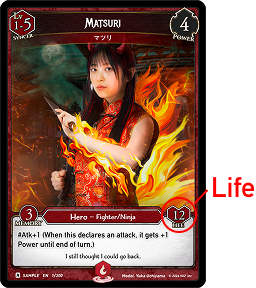
❶Hero Card
Hero card represents the player's character in the battle. Only one Hero card can be included in your deck.
❶Life
The player’s starting life total.
❷Card Type
Indicates the type of this card.
❸Skill Class
The Skill Classes this Hero possesses.
❹Evolution Level
Shows the Hero’s evolution level.
❺ Hero Color
The VAZ Color associated with this Hero.
❻ Memory Count
Indicates the maximum number of Skill cards (excluding VAZ Skills) that can be included in the Skill Deck.
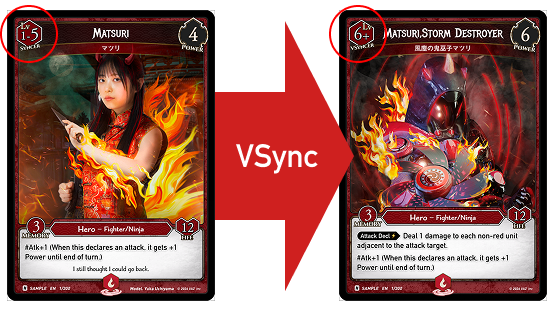
What is V-Sync?
Each Hero can change their abilities by flipping the card when the conditions are met during the level-up phase.
(For example, in Matsuri's case, the Hero can V-Sync when their level reaches 6 or higher.)
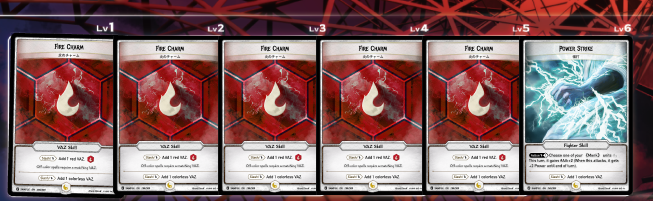
What is Level?
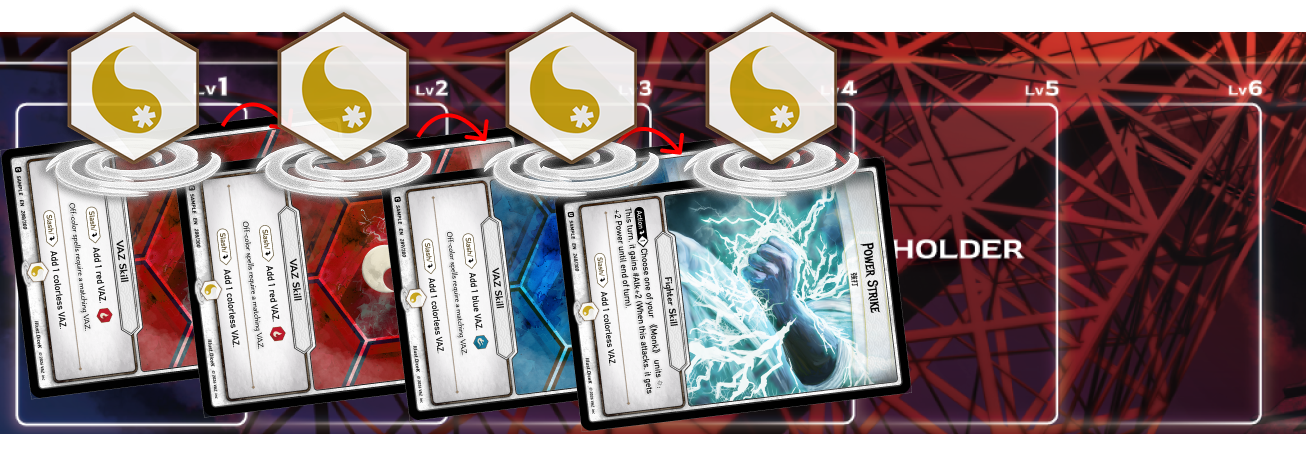
During your level-up phase, the number of skills in the Holder determines the Hero's level.
❷Skill Card
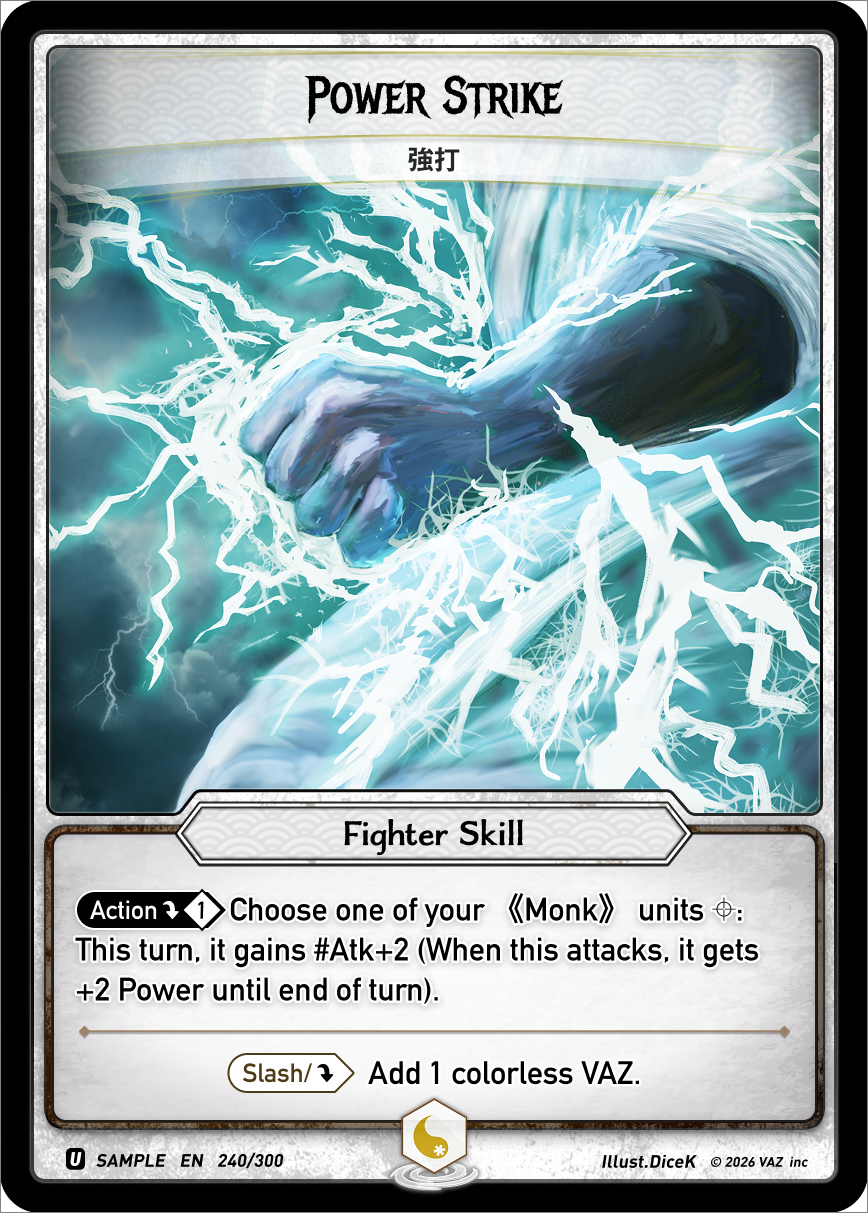
Skill cards are used to generate Vaz or trigger powerful abilities that can change the tide of the game.
You can use skills that match the Hero's skill class or skills labeled as "Generic”.
Skill card’s type
Skill cards can be included in the Skill Deck up to the Hero’s Memory Count.
(Only one copy of each Skill card may be included.)
Skill cards can be included in the Skill Deck up to the Hero’s Memory Count.
(Only one copy of each Skill card may be included.)
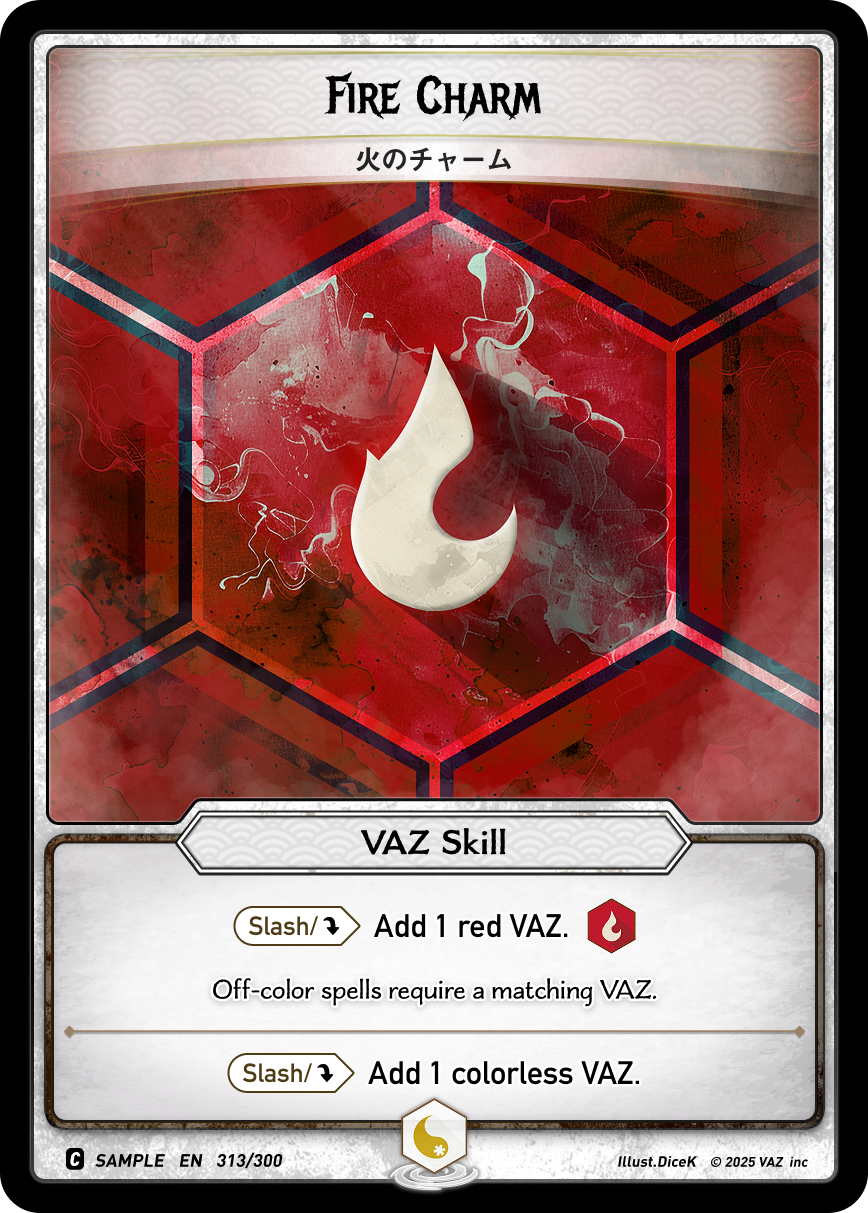
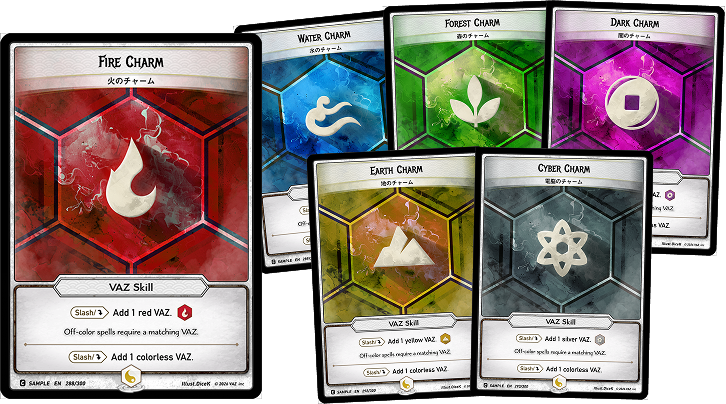
VAZ Skills are skills that possess the ability to generate VAZ.You can be included in the Skill Deck as many as you like.
💡
Any effect that targets a Skill also targets VAZ Skills.
VAZ Generation
All Skill cards have the ability to generate 1 colorless VAZ when they are Synced.
All VAZ Skills generate 1 VAZ of your Hero’s Color.
By Syncing an Unsynced Skill in the Holder, that Skill functions as a resource card that generates 1 VAZ.
In general, players gain two Skill cards per turn.
Skill Abilities
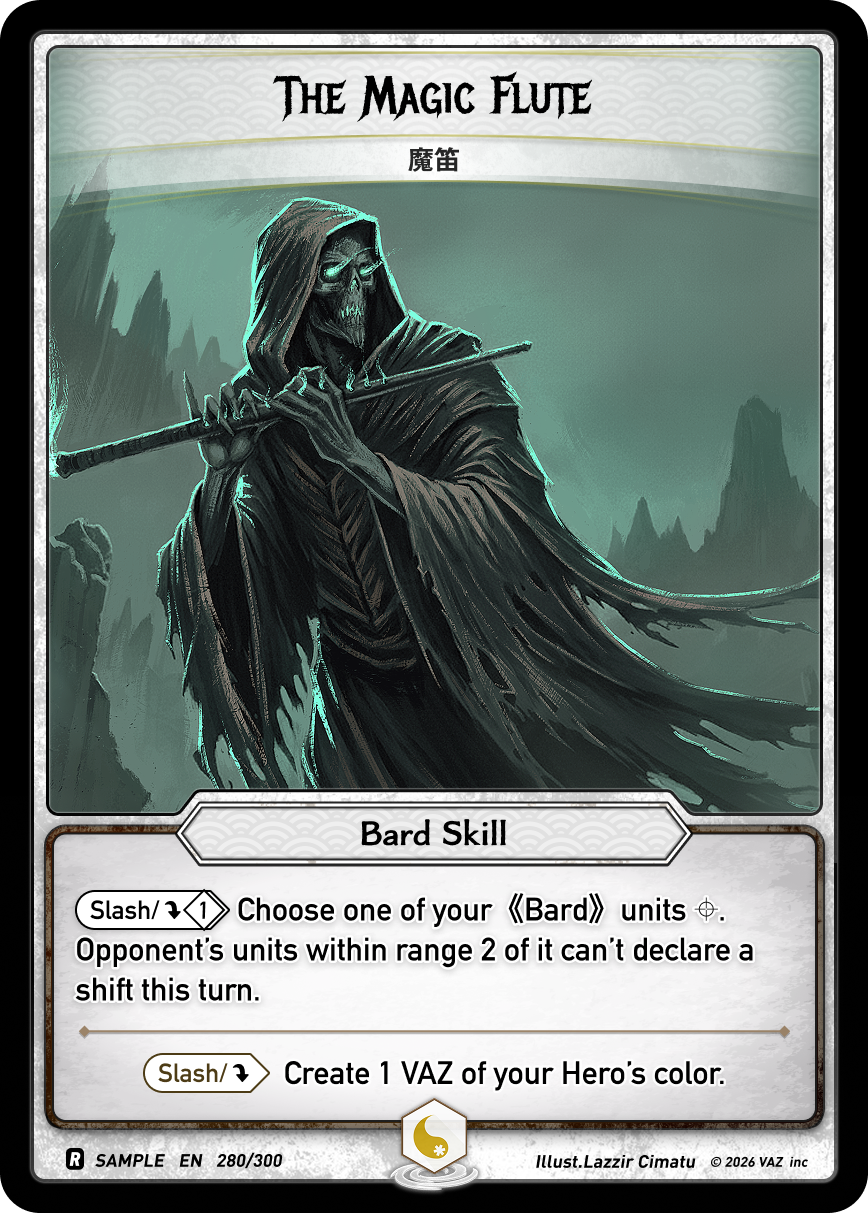
Skill abilities are abilities that enhance or support units with the specified skill class, indicated by 《》
Abilities labeled as 'Action' can be activated during the main phase. Effects labeled as 'Slash' can be used at any timing.
Skill Class List
A class with skills that enhance the Hero's melee combat or directly strengthen units.
《Fighter》
A class that boasts strong physical abilities and close combat techniques. Known for overwhelming enemies with powerful fist techniques.
《Samurai》
A class that values the way of the samurai and excels in swordsmanship. Specializes in decisive one-hit slashes.
《Ninja》
A class that confuses enemies with swift movements and stealthy actions. Expert in exploiting openings with tricky strategies.
A class with skills that deal damage or effects via ranged attacks.
《Tamer》
A class that communicates with spirit Veasts and Spirits, fighting alongside them. Partner coordination is key.
《Archer》
A class that uses precise archery for long-range attacks. Specializes in applying status effects and has a wide range.
《Gunner》
A class that expertly handles firearms. Known for overwhelming firepower and area-of-effect attacks in designated directions.
A class with skills that apply buffs or debuffs to units.
《Warlock》
A class that boasts strong physical abilities and close combat techniques. Known for overwhelming enemies with powerful fist techniques.
《Sherman》
A class that values the way of the samurai and excels in swordsmanship. Specializes in decisive one-hit slashes.
《Cleric》
The Cleric class is a defensive class that utilizes holy power for healing and unshakable defense.
A class with skills that interfere with the rules of the game.
《Hacker》
A class that masters the power of the digital world. Analyzes enemy information and uses positional manipulation to turn the tide of battle.
《Bard》
A class that uses knowledge and insight to fight. Known for strategies that exploit enemy weaknesses.
《Alchemist》
A class that changes materials, handling potions and explosives. Specializes in using and handling commands.
❸ Portal Card
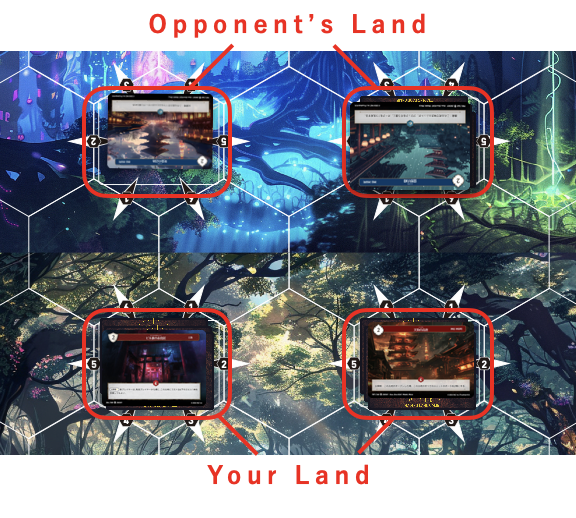
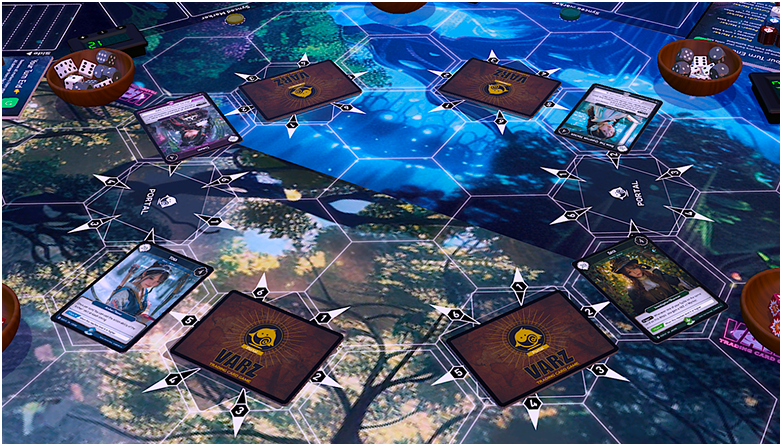
Portal cards are placed face up on each of the two lands on your side of the field, with four cards on each land (eight total).
They affect units and players on the lands where they are revealed.
When a Portal takes damage equal to or greater than its Shield Life, that Portal is destroyed.
When a Portal is destroyed, its controller takes that Portal is put into its owner's Ruins. Then that Portal's controller loses life equal to its Shield Life.
A Portal Deck must be constructed so that the total Shield Life of all included Portals is exactly 20.
Colored Portals may only be included if their color matches the Hero’s Color.
Portal cards with effects may be included at one copy per card name.
💡
Damage dealt to a Portal is accumulated until the end of the turn.
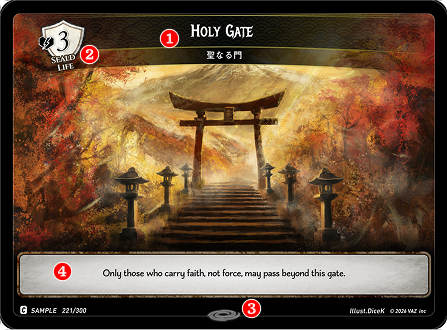
❶Card Name
The name of this card.
❷Shield Life
Indicates the Shield Life of this card.
❸Color Type
Indicates the Color Type of this Portal.
❹Card Effect
Indicates the effect of this Portal.
The effects of revealed portals apply to units and players in adjacent spaces, regardless of whether they are allies or opponents.
If a unit is in a space where two lands overlap, both effects will apply to that unit.
※ When multiple land effects/timings conflict, the effects are triggered starting from the land on the active player's right side (or front), proceeding clockwise.
❹ Spell Cards
The main deck is constructed with 30 Spell cards. Spell cards include three card types: Spil, Command, and Slash.
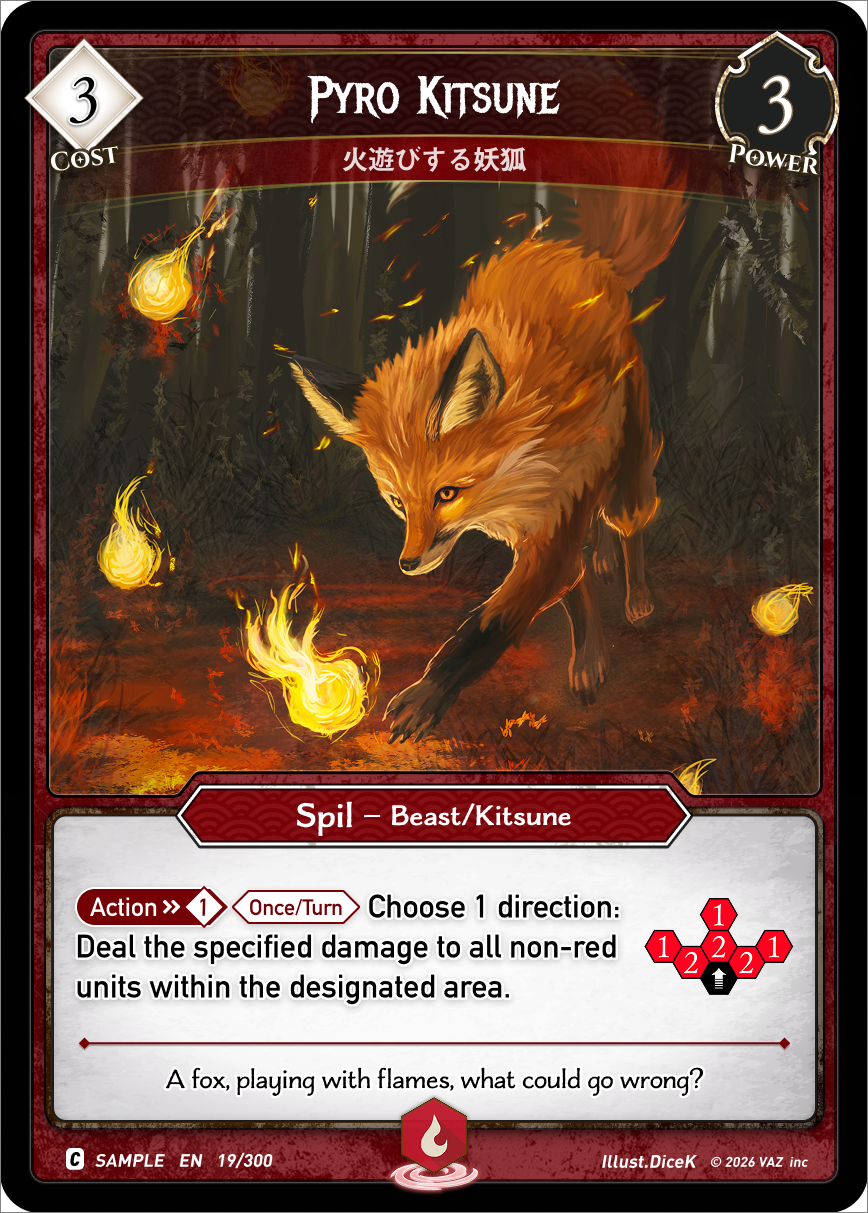
Spil
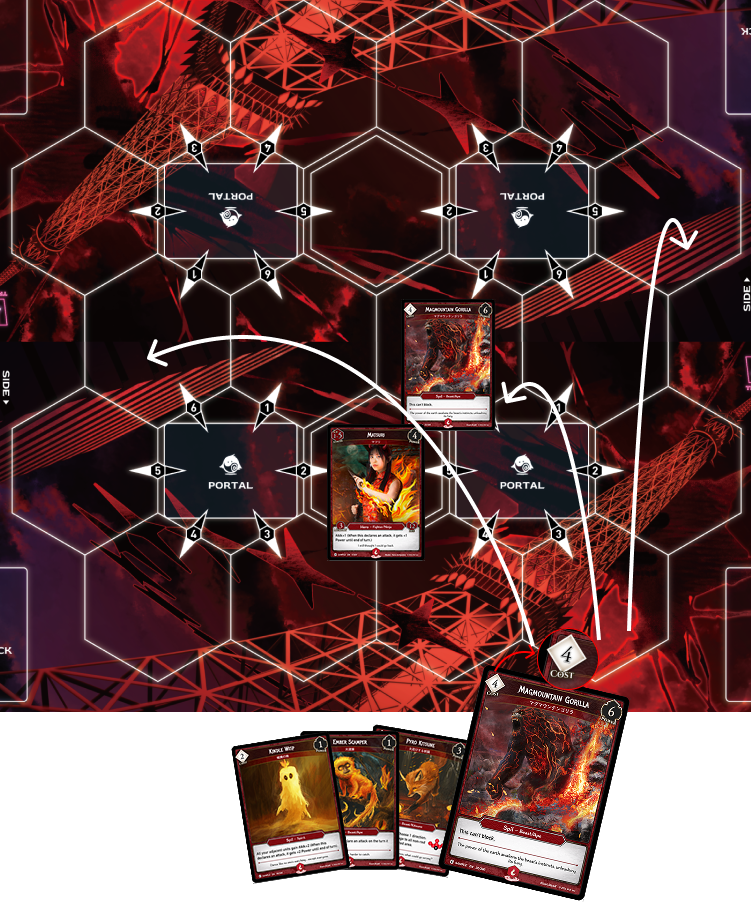
A spell to summon Spils that fight alongside your Hero. Pay the cost at the top left to summon it to the field.
Summoning Spils
When summoning a Spil, choose one empty hex on the field.
If the chosen hex becomes invalid for summoning due to a Slash effect or similar effect, you may choose a different empty hex and summon the Spil there instead.
If you cannot choose another empty hex, the summon fails and the Spil is sent to the Abyss.
Command
A one-time-use spell that supports your ally's combat.
Slash
Slash cards can be played during Slash timing, and unless otherwise specified, also during your action timing.
3.2 The Six Colors of VAZ
Six heroes with different VAZ colors await you. Choose the color that resonates with your soul and get your starter deck.
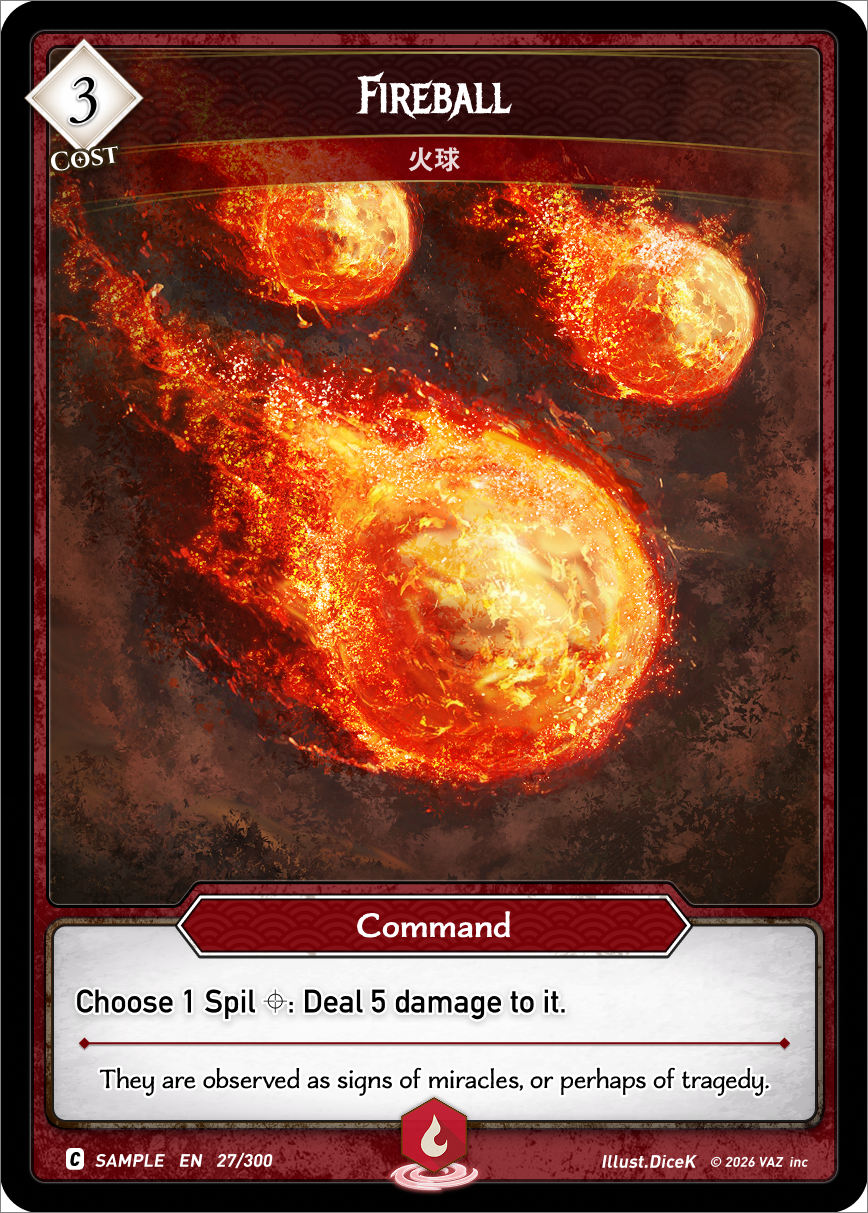
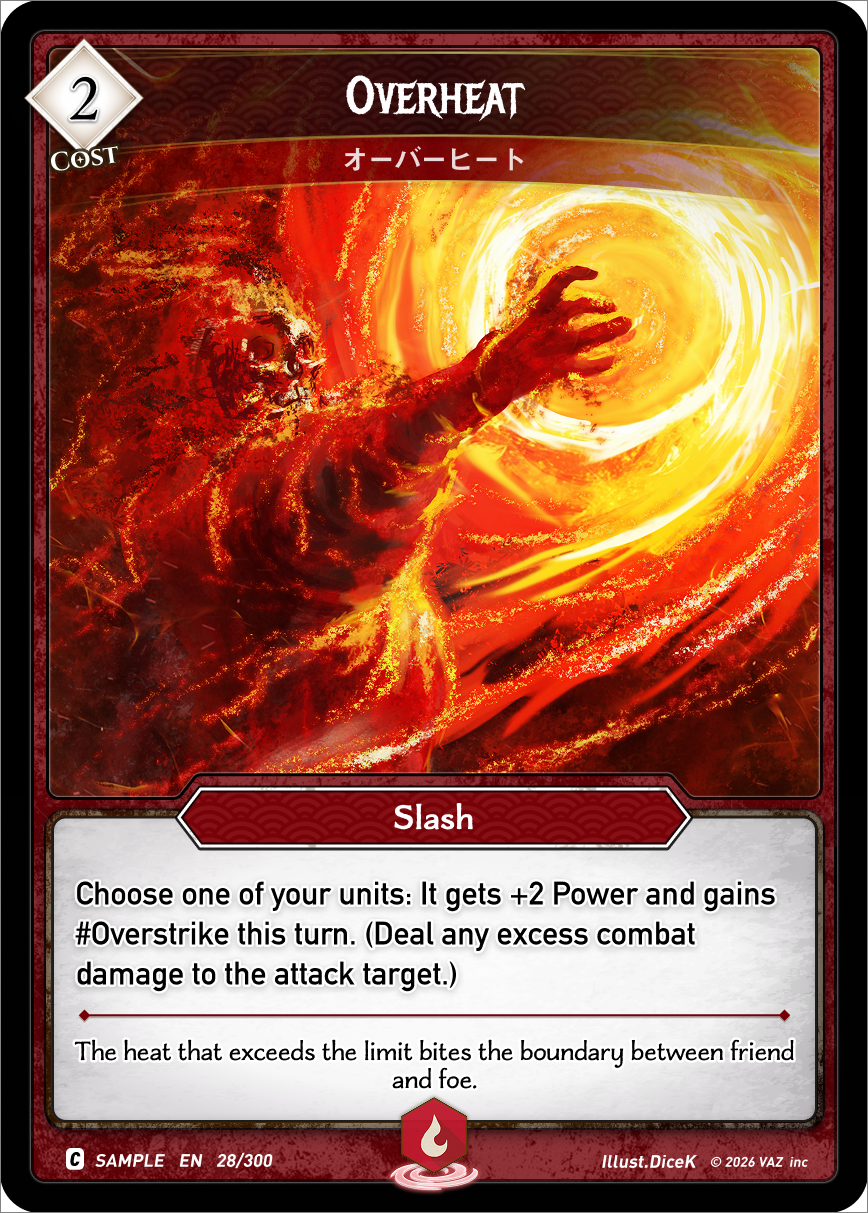
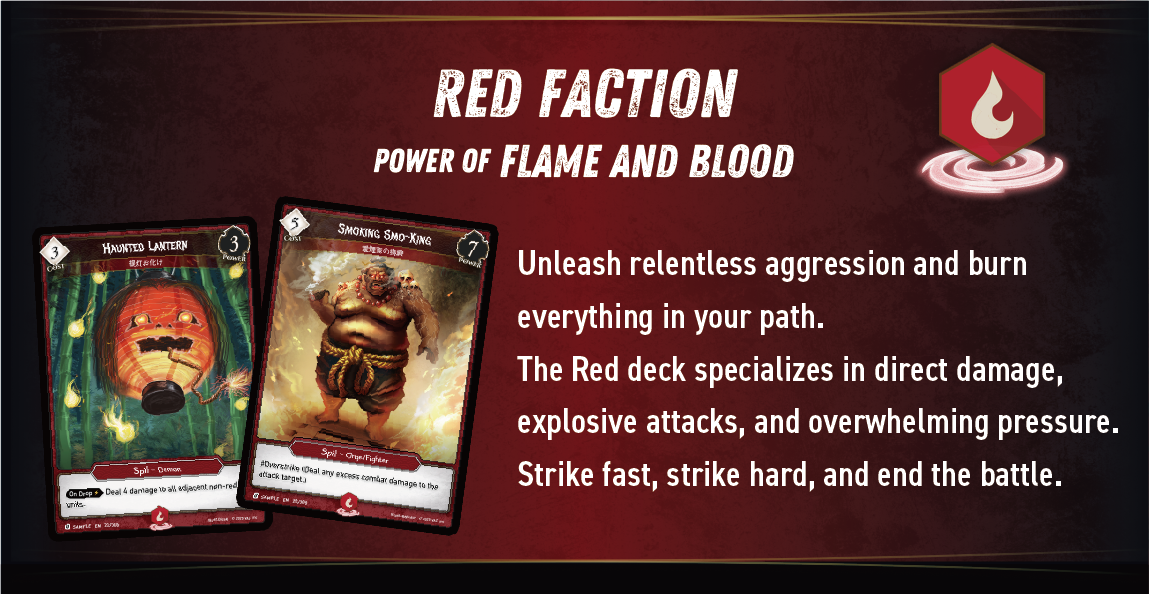
Red Deck
Tactical Focus: "Damage dealing”
Unleash relentless aggression and burn everything in your path.
The Red deck specializes in direct damage, explosive attacks, and overwhelming pressure. Strike fast, strike hard, and end the battle.
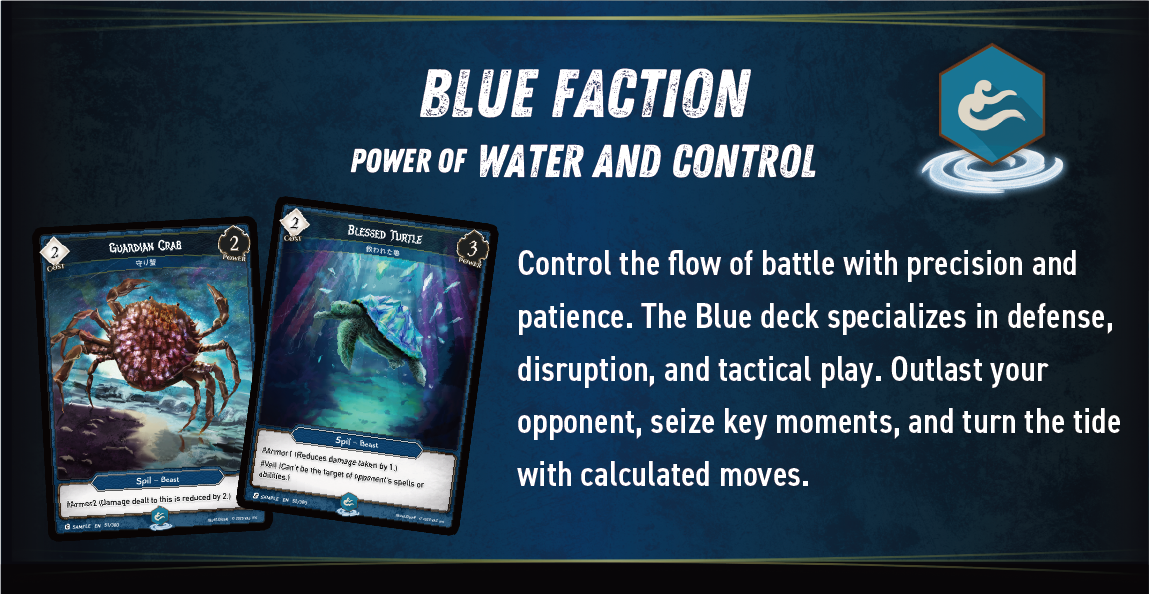
Blue Deck
Tactical Focus: "Spells / Disruption”
Control the flow of battle with precision and patience. The Blue deck specializes in defense, disruption, and tactical play. Outlast your opponent, seize key moments, and turn the tide with calculated moves.
Green Deck
Tactical Focus: "Spil Power”
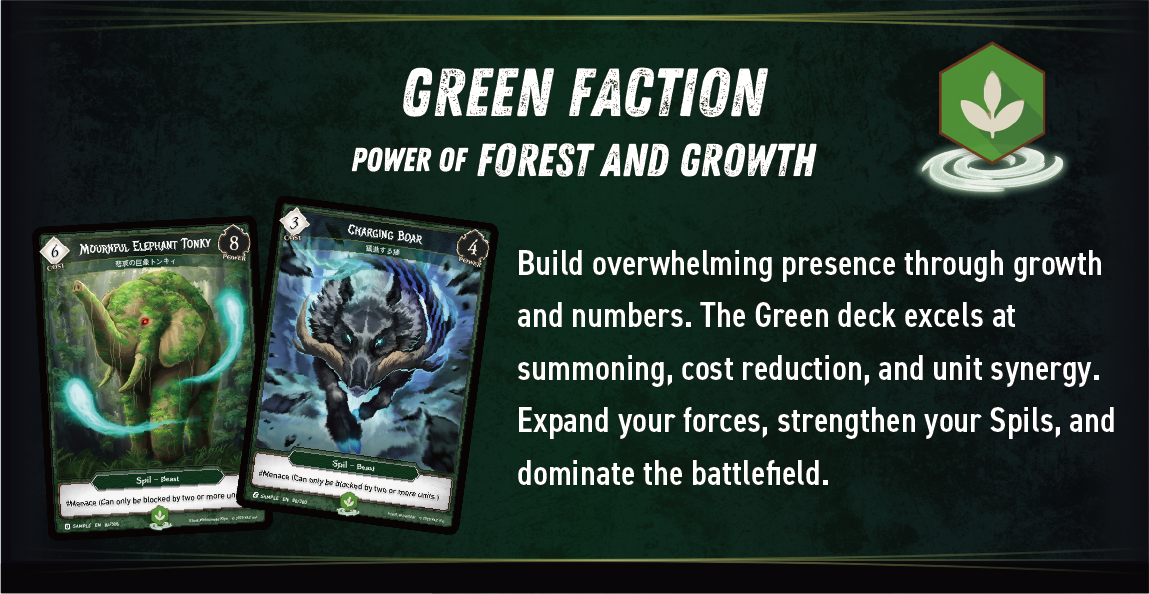
Build overwhelming presence through growth and numbers. The Green deck excels at summoning, cost reduction, and unit synergy.
Expand your forces, strengthen your Spils, and dominate the field.
Purple Deck
Tactical Focus: "Debuff”
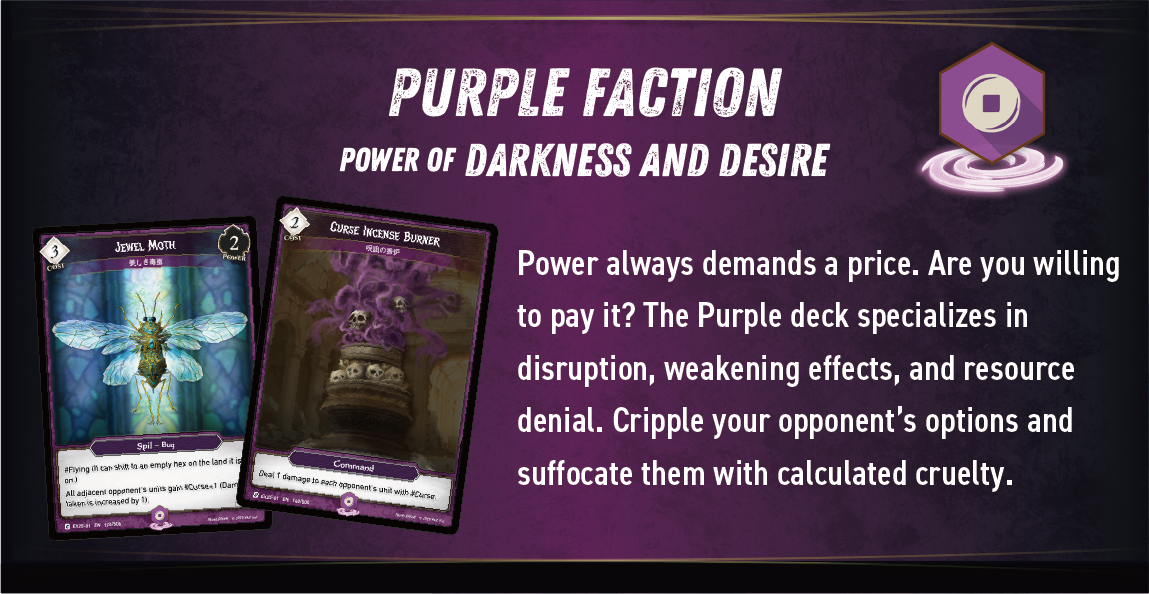
Power always demands a price. Are you willing to pay it? The Purple deck specializes in disruption, weakening effects, and resource denial. Cripple your opponent’s options and suffocate them with calculated cruelty.
Yellow Deck
Tactical Focus: "Defense / Counter”
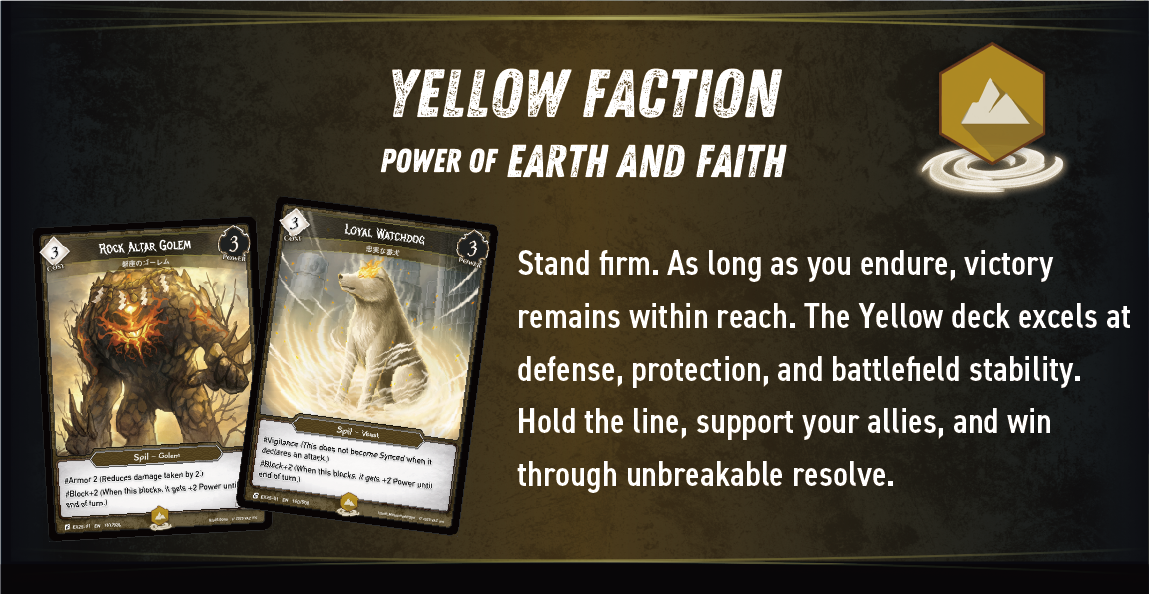
Stand firm. As long as you endure, victory remains within reach. The Yellow deck excels at defense, protection, and field stability.
Hold the line, support your allies, and win through unbreakable resolve.
Silver Deck
Tactical Focus: "Board manipulation”
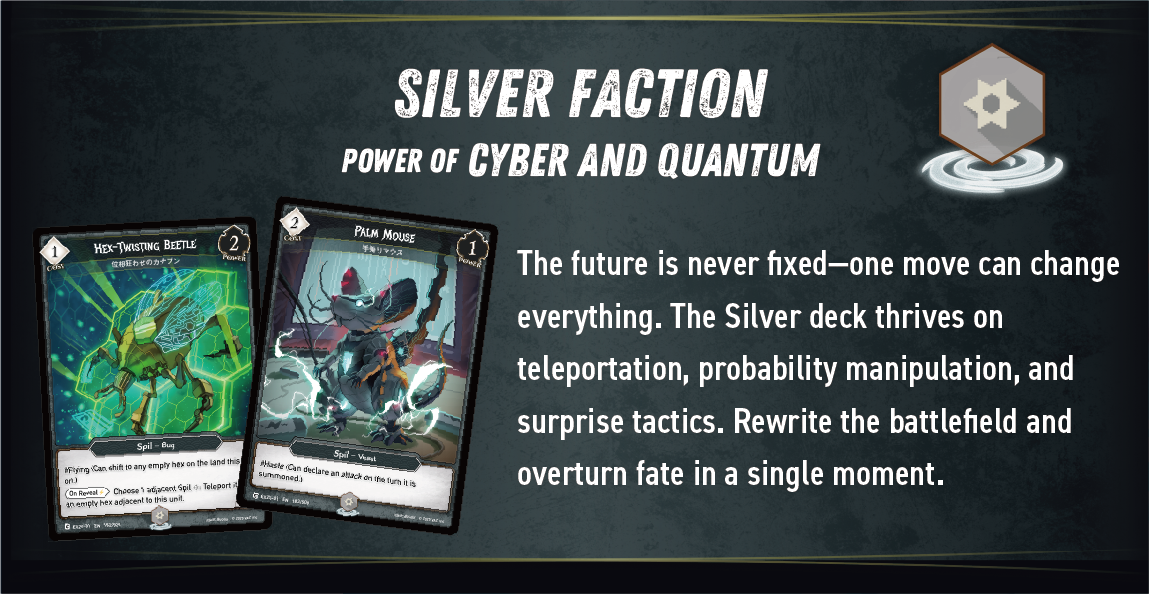
The future is never fixed—one move can change everything.
The Silver deck specializes in ambush tactics driven by board manipulation, including teleportation and control-stealing effects.
Rewrite the field and overturn fate in a single moment.
3.3 Deck Construction Rules
In VARZ, you can build decks using multiple colors.
However, when you add more colors, managing VAZ (energy) becomes important.
💡
1. Your Hero’s Color is Your Base
Each Hero has a color.
👉 All Skills can generate VAZ of the same color as your Hero.
This means:
A Red Hero → 🔴 Red VAZ is always available
A Blue Hero → 🔵 Blue VAZ is always available
👉 Your Hero’s color is stable and reliable.
💡
2. To Use Other Colors, You Need VAZ
If you want to use cards of a different color:
👉 You must include that color’s VAZ in your Skill Deck.
Example:
Using Blue cards with a Red Hero → you need 🔵 Blue VAZ
💡
3. You Pay Costs with Matching Colors
To play a card:
👉 You must spend VAZ matching that card’s color.
Example:
A 🔵 Blue 3-cost Spil
→ requires 3 Blue VAZ
💡
4. Gameplay Example
Using a Blue Spil with a Red Hero:
Include 🔵 VAZ in your Skill Deck
Generate or prepare 🔵 VAZ during the game
Spend 3 🔵 VAZ to play the card
💡
Summary (Key Concept)
👉
Hero’s color → always available (stable)
Other colors → require VAZ (setup needed)
Costs → must be paid with matching colors
💡
In One Sentence
👉
“To use more colors, you need to generate and spend the matching VAZ.”
This system makes deck building strategic:
👉 More colors = more options, but more planning required.
3-4. How to cast a Spells
Step 1
Check the VAZ cost of the spell you want to play from your hand.
Step 2
By flipping an unsynced skill in the holder, VAZ is generated.
Note:A skill in the synced state cannot be flipped.
Step3
Select an empty space on the field and summon the card.
Sync and Unsync
A card becomes Synced when it declares an attack, or when it performs an Action or Slash ability that requires syncing.
A Synced unit generally cannot declare attacks, be declared as a blocker, or perform a normal Shift. However, being Synced does not automatically remove a unit from combat.
4. Game System
4.1 Definitions of Targeting/Range Terms
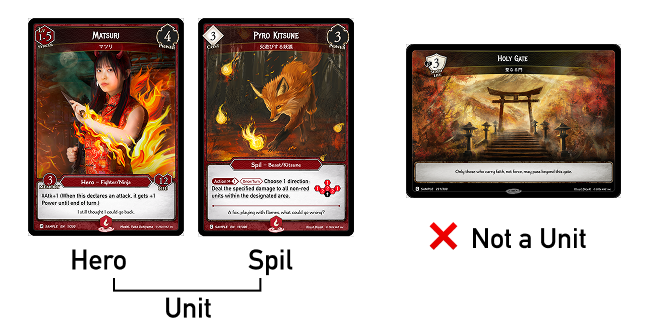
Definition of Unit
Units are defined as both Heroes and Spils on the field.
Therefore, spells or abilities that target units cannot deal damage to portals.
How to designate allies and opponent
All Units
Your Units
Opponent's Units
All Heroes
Your Hero
Opponent's Hero
All Spils
Your Spils
Opponent's Spils
For example, if there is an effect that says "Deal 4 damage to all units in the specified range," 4 damage will be dealt to both allies and opponents, regardless of the side.
Targeting Effects
Abilities that cannot be targeted, such as #Veil (This unit cannot be targeted by spells or abilities your opponent controls.), cannot nullify effects that do not target a specific unit, such as area-of-effect attacks or effects that do not target units but rather specify a particular space or direction.
Example 1: "Choose one square within a range of 2: Deal 2 damage to the unit in that square."
Example 2: "Choose a direction from the position of your allied 《Gunner》 Hero: Deal 3 damage to the nearest unit in that direction."
💡
Effects that target a specific unit are marked with the "⌖" symbol next to the target. When determining whether #Veil applies, refer to this symbol.
4.2 Range
💡
“Adjacent to~”
💡
“Up to range 2~”
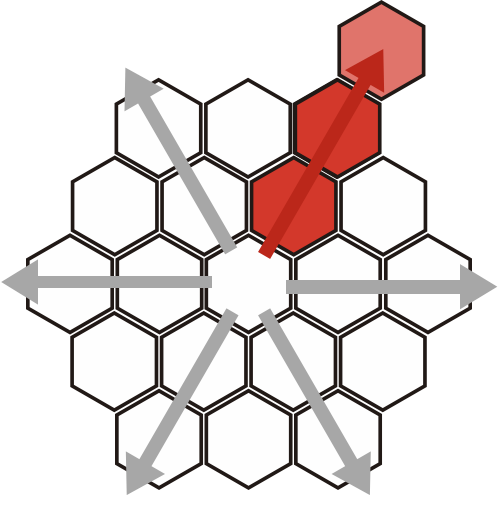
💡
“Chose a Direction~”
💡
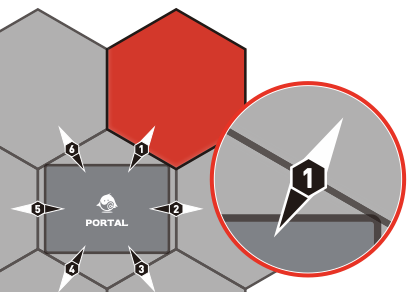
“The hex matching the die result”
Certain card effects specify a range based on the die roll result. In this case, the unit in the square corresponding to the land number indicated by the die result becomes the target.
※ If the "Die Direction~" is specified and it spans multiple lands, you may choose one land and follow its direction.
💡
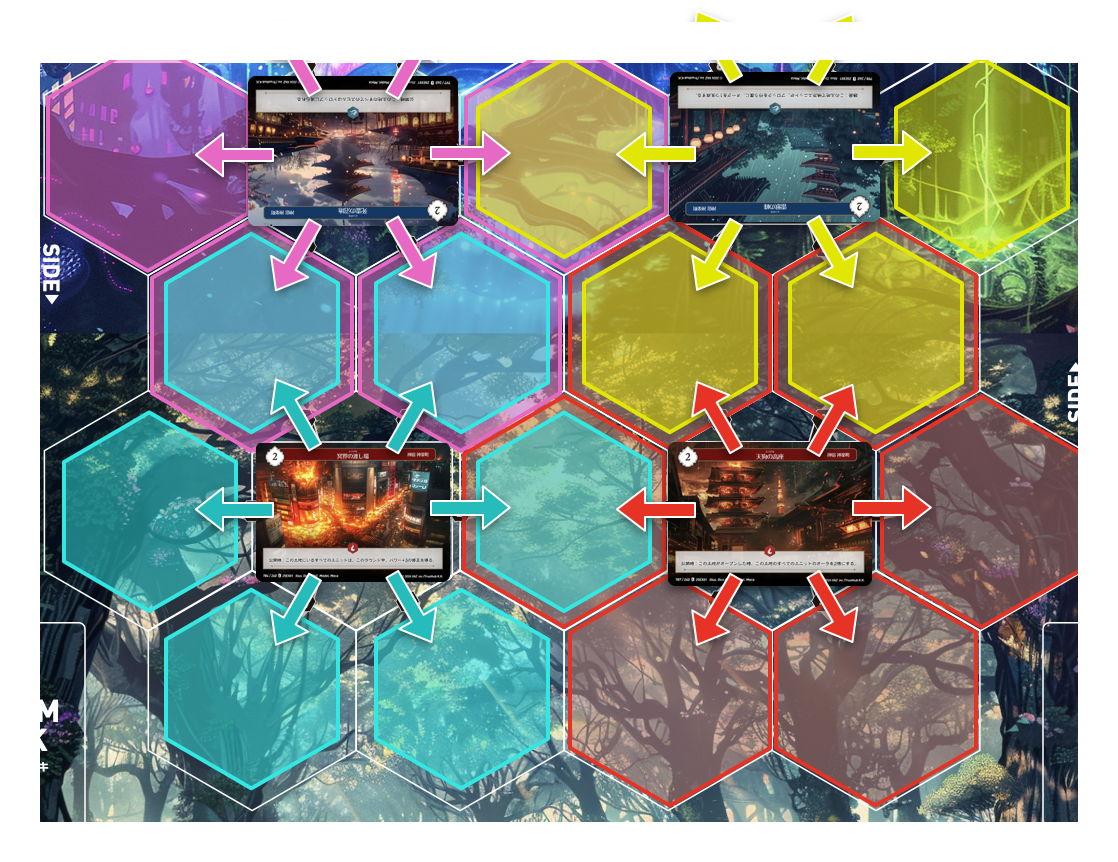
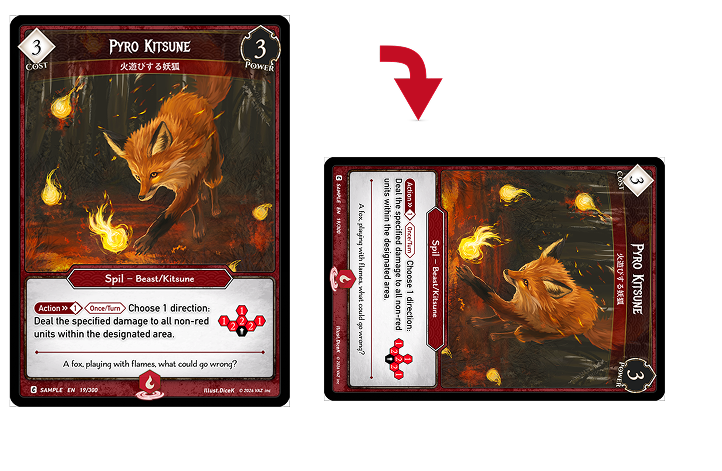
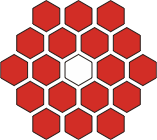
“Designated area”
Effects with a specified range apply from the white square (the unit’s position) to the red squares, affecting the cards located in those squares.
4.3 Field Zone
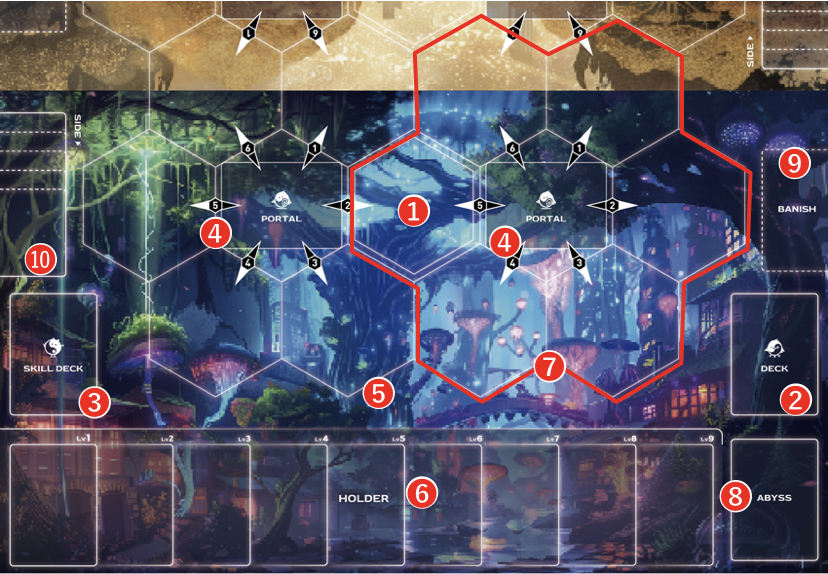
❶Start Hex
The Hex where the Hero is placed.
❷Deck
The area where the Spell Deck is placed.
❸Skill Deck
The area where the Skill Deck is placed.
❹Portal
The area where the Portal Deck is split and placed at the start of the game.
❺Field/Hex
The area where cards are placed, consisting of 22 hex. A unit can be placed on each square, with a maximum of one unit per hex.
❻Holder
The area where Skill Cards are placed.
❼ Land
The term "Land" refers to a Portal zone along with the six hexes surrounding it.
❽Abyss
This is the zone where dropped or discarded cards are placed.
❾ Banish
The area where cards that are removed from the game are placed.
➓Ruins
The area where destroyed or acquired land cards are placed.
11. Field
The field is the public zone where Heroes, Spils, Portals, lands, and hexes exist. The Holder is a separate zone for Skill cards.
5. Turn Structure
5.1 Unsync Phase
Unsync all cards you control.
5.2 Level Up Phase
Place two Skill cards from your Skill Deck face up into the Holder.
The Hero’s level increases based on the number of Skill cards in the Holder.
If, at this time, your Hero’s level is equal to or higher than the Evolution Level shown in the upper-left of the Hero card, V-Sync that Hero (turn it face down).
5.3 Draw Phase
Draw one card from your Deck.
5.4 Start Phase
Effects labeled “Turn Start” trigger during this phase.
5.5 Main Phase
During the Main Phase, you may perform the following four actions in any order, as many times as possible.
At the start of this phase, effects labeled “Main Start,” “Your Main Start,” and “Opponent’s Main Start” trigger.
5.6 End Phase
①Effects labeled "End of Turn ︎" will trigger.
❷Remove all damage from all units and portals.
❸Effects that are labeled as "during this turn" are nullified.
❹If you have 7 or more cards, discard cards until you have 6.
6. Actions During the Main Phase
Perform the actions in any order, any number of times.
💡
❶Cast a spell
You can cast a spell from your hand by paying its VAZ cost and following its effects.
💡
❷Activate ability
You can activate any ability on your
units and skills.
⚠️ Spils summoned this turn cannot activate abilities that require Sync.
💡
❸Shift Decl
Each of your unsynced units may be shifted once per turn.
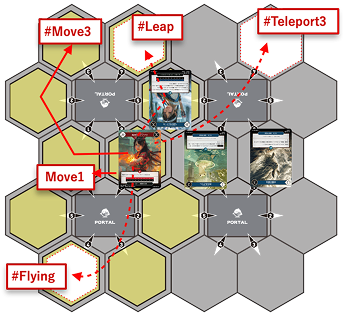
・All units have the "Move1" shift ability
(move to an adjacent empty hex).
・Units with shift-related keyword
abilities like #Flying, #Leap, or
#Teleport may be able to move
more than 1 hex.
⚠️ Spills summoned during this
turn cannot be shifted.
💡
❹Attack Decl
You may attack once with each of your unsynced units.
To attack, sync your unit and choose an adjacent opponent’s unit or portal as the target.
⚠️ Spills summoned this turn cannot Attack Decl.
⚠︎ Each player cannot Shift and Attack during their first turn.
6.1 Cast a Card
Pay the VAZ cost and play a card from your hand.
Summoning Spils
Spils can be summoned to any empty space on the field.
Cast Commands and Slashes
When casting spells other than Hero Colors
You may include Spells of colors other than your Hero’s Color in your Deck.
In that case, when casting a Spell or activating an ability of a color other than your Hero’s Color, you must pay the entire required VAZ cost using VAZ corresponding to that Spell’s color.
6.2 Shift a Unit
Each Unsynced allied unit on the field may shift once per turn.
All units have the shift ability “#Move1 (This unit may move 1 hex to an adjacent empty hex).”
All units have the shift ability “#Move1 (This unit may move 1 hex to an adjacent empty hex).”
Spils summoned this turn cannot be shifted.
Units with shift-related keyword abilities such as #Flying, #Leap, or #Teleport may be able to move more than 1 hex.
Each time you choose a unit and designate a destination hex, priority is given to the opponent.
If, at this time, shifting becomes impossible due to an opponent’s Slash effect or a similar effect, you may choose a different destination hex and shift instead.
If the unit does not shift as a result, that unit’s shift opportunity for this turn is lost.
⚠️
During each player’s first turn, units cannot Shift or declare an attack using their basic abilities.
A Spil cannot Shift or declare an attack during the turn it is summoned.
Shifts or attacks granted by Skills or card effects are allowed.
Shift-Related Keyword Abilities
#Move N
Can move up to N hexes.
#Flying
Can shift to any empty hex on the land where this unit is located.
#Leap
Can shift over adjacent units to an empty hex.
#Teleport N
Can shift to an empty hex within a range of N hexes.
6.3 Activate an Ability
You can activate action abilities that are labeled "Action"/”Slash” on your Heroes, Spils, Skills, etc.
Action abilities are represented by the following labels:
Activate Icon: You do not need to Sync.
Sync Icon: Syncing is required for activation.
⚠️Abilities with a Sync icon cannot be activated until the start of your next turn.
Activate Cost: This is the VAZ cost to activate the ability.
Can be activated by syncing.
How to Express the Effect
If the effect is written in the following format, syncing must be done, in addition to fulfilling the activation cost or condition.
(Action⤵︎) Activation cost / : Effect
6.4 Declare an Attack
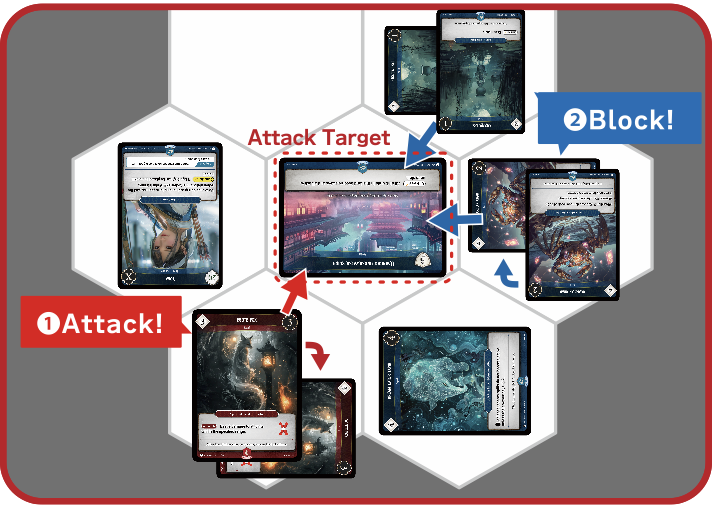
By Syncing one Unsynced allied unit and selecting one adjacent enemy unit or enemy Portal as its attack target, a player may declare an attack.
A player may declare an attack using one Unsynced allied unit against an enemy unit or an enemy Portal.
Each unit may declare only one attack per turn.
Once an attack is declared, the unit’s attack right is consumed, even if the attack fails and no combat occurs.
Attack Declaration Procedure
An Attack Declaration is performed in the following order:
① Select the Attacker
The player selects one Unsynced allied unit as the attacker and Syncs it.
② Select the Attack Target
The player selects one adjacent enemy unit or enemy Portal as the attack target.
③ Confirm the Attack Declaration
At this point, both the attacker and the attack target are fixed.
The attack target cannot be changed after this point.
④ “On Attack Declaration” Effects & Slash Timing
Once the attack target is fixed, “On Attack Declaration” effects trigger and are placed on the stack.
At this timing, players may use Slash effects.
⑤ Combat Validity Check
After all stack resolutions during the Attack Declaration are complete,
the game checks whether combat is valid.
Combat proceeds to the Block Declaration Step only if all of the following conditions are met:
Both the attacker and the attack target are still on the field
The attack target is still adjacent to the attacker
If either condition is not met, combat does not occur and the attack fails.
Restrictions on Attack Declaration
A Spil summoned during the current turn cannot declare an attack.
During each player’s first turn, attacks cannot be declared.
Case Studies
💡
Case 1: The Target Moves
If the attack target is moved by a Slash effect after the attack is declared:
If the target is still adjacent to the attacker at the end of the Attack Declaration
→ Combat proceeds
If the target is no longer adjacent
→ Combat does not occur
💡
Case 2: The Target Is Dropped or Destroyed
If the attack target is dropped or destroyed during the Attack Declaration:
→ Combat does not occur
(The attack right is still consumed.)
💡
Case 3: The Target Gains #Stealth After Declaration
If the attack target gains #Stealth
(Cannot be chosen as an attack target by an opponent) after the attack is declared:
→ Since the attack target was already fixed, combat continues normally.
💡
Case 4: A #Taunt Unit Appears After Declaration
If a unit with #Taunt is summoned adjacent to the attacker after the attack is declared:
→ The attack target is already fixed, so the target does not change and combat continues.
#Taunt
(All adjacent enemy units must choose this unit as the attack target when declaring an attack.)
💡
Case 5: When the Attack Target Is Replaced by Swap
If a Swap effect is applied (such as by a Slash effect) and the attack target
is replaced by another unit:
→ If the unit moved by Swap is adjacent to the attacker,
the combat proceeds as normal.
→ If it is no longer adjacent to the attacker,
the combat does not occur.
Swap:
Swap is a form of Shift that exchanges the positions of two or more units or objects. It has no path and does not consume a normal Shift Right unless specified.
6.5 Pass or End the Main Phase
When the active player declares “pass,” the Main Phase ends and the game proceeds to the End Phase.
7. Combat
7.1 Combat Overview
If combat is established by an attack declaration or by an effect, the game proceeds to the Combat Phase.
The Combat Phase is divided into the following steps:
① Block Declaration Step
② Damage Step
After these steps are completed, the Combat Phase ends and the game returns to the Main Phase.
During the Combat Phase, players cannot use Command cards.
Only Slash cards and triggered abilities may be used during the Combat Phase
7.2. Block Declaration
The Block Declaration Step is performed after the Attack Declaration has been completed, or when combat is established by an effect.
During this step, the defending player decides whether and how to block the attack.
Block Declaration Procedure
① Checking Eligible Blockers
The defending player may use their own units as blockers if all of the following conditions are met:
The unit is Unsynced
The unit is on a hex adjacent to the attack target
The unit is in a blockable state
② Declaring Blocks
For each attacking unit, the defending player chooses one of the following options:
Do not block
Block with one or more units
If blocks are declared, all selected blockers become Synced.
As long as a unit remains Unsynced, it may be declared as a blocker any number of times per turn.
③ Verifying Block Restrictions
A block declaration is invalid if it does not satisfy the following conditions:
If the attacker has #Menace
→ It can only be blocked by two or more units
If the attacker has an effect such as
“This cannot be blocked by ◯◯”
→ It may only be blocked if the stated condition is met
④ Finalizing the Block Declaration
Once the block declaration is completed:
The chosen blockers and their block assignments are locked in
“On Block Declaration” abilities trigger and are placed on the stack
At this timing, players may use Slash effects.
If, as a result of resolving Slash effects, there are new units that become eligible to block, the defending player may declare additional blocks.
Additional block declarations may be made after each Slash effect resolves.
Once all effects on the stack have resolved, the blockers and block assignments are finalized, and the game proceeds to the Damage Step.
Case Studies
Case 1: A Blocker Changes Position After Block Declaration
If the unit is still adjacent to the attack target
→ It remains a valid blocker
If the unit is no longer adjacent to the attack target
→ It cannot participate in the block
Case 2: The Attacker Gains #Menace After Block Declaration
If, during a Slash timing, the attacker gains #Menace
(“Can only be blocked by two or more units.”)
→ The block fails unless two or more blockers are assigned.
7.3 Damage Step
The Damage Step is performed in the following order:
① Combat Damage Resolution
② State-Based Actions Caused by Combat Damage
③ Resolution of Effects Triggered by State-Based Actions
After all of the above processes are completed, the game returns to the Main Phase.
Damage Processing in Combat
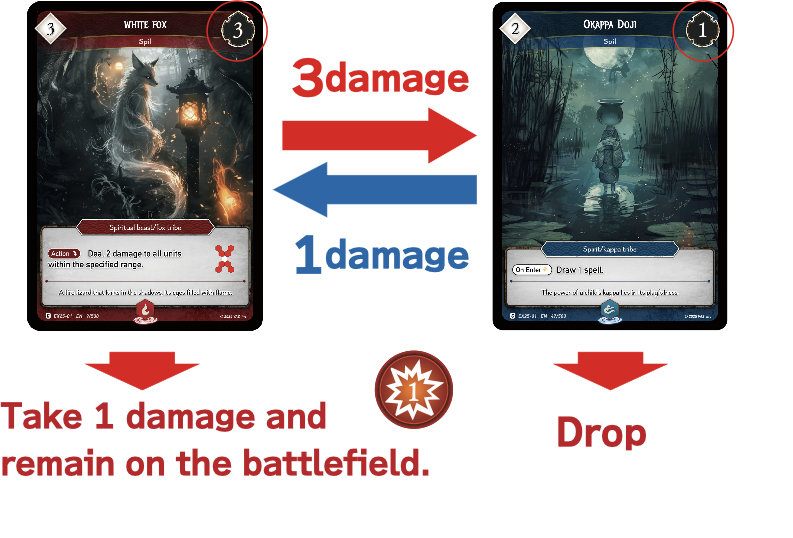
In combat between units (Hero/Spil), their power is compared. Power is calculated by subtracting the damage a unit has taken from its base power. Both units then deal damage to each other simultaneously. If a Spil's power becomes 0 or lower, it is sent to the Abyss. Any remaining units on the field receive damage.
If the attack target is unsynced:
In combat, both units deal damage equal to their power to each other simultaneously.
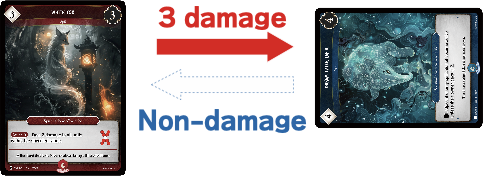
If the attack target is in a synced state:
The attacker deals combat damage to the target unilaterally.
If blocked by multiple units:
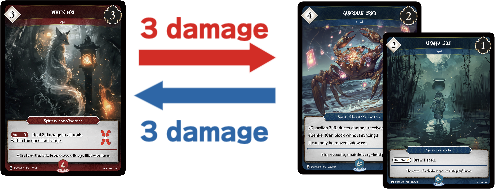
If multiple blockers exist, the attacking player assigns combat damage among those blockers as they choose. They must assign all combat damage if possible.
If attacking with a unit that has #OverStrike:
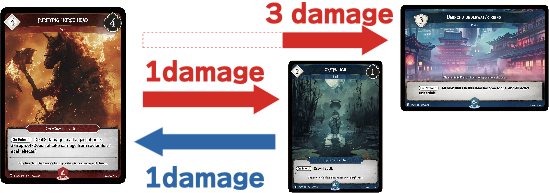
When attacking with a unit that has #OverStrike (which deals excess combat damage to the attack target), any excess damage, even if blocked, is dealt to the attack target.
Post-Combat Effect Processing
❶All units that have received combat damage perform the following state-based actions simultaneously:
Spils with power of 0 or less are drpoped and sent to the Abyss.
Spils that have received lethal damage are sent to the Abyss.
A portal that takes damage equal to or greater than its Shield Life is destroyed and put into its owner's Ruins. Then that Portal's controller loses life equal to its Shield Life.
If a Hero's life is 0 or less, that player loses the game.
If a portal on any land has 0 cards, that player loses the game.
②Afterward, trigger effects caused by state-based actions are processed in the following order:
Process effects triggered by being sent to the drop or taking damage.
After processing all triggered effects, if a portal was destroyed, the next portal will be revealed.
※ When any trigger effect occurs, the active player gains priority.
※ The handling of multiple simultaneous trigger effects is detailed in other rules.
8. Timing and Advanced Rules
8.1 The Golden Rule of VARZ
💡
Card effects override the rules.
If the content written on a card's rules text directly contradicts the content written in the official rules, the card's text takes priority. Cards only disregard rules that apply to that specific situation. The only exception to this rule is that players can always concede the game.
💡
"Can't" takes precedence over "Can.”
When a rule or effect allows you to do something, or states that you must do something, and another effect says that you can't do the same thing, the "can't" effect takes precedence.
💡
Impossible instructions are ignored.
If part of a process instructed by a card or rule cannot be performed, that part is ignored, and only the other executable parts of the process are carried out. The ignored part is never considered as executed.
8.2 Stack and Resolution
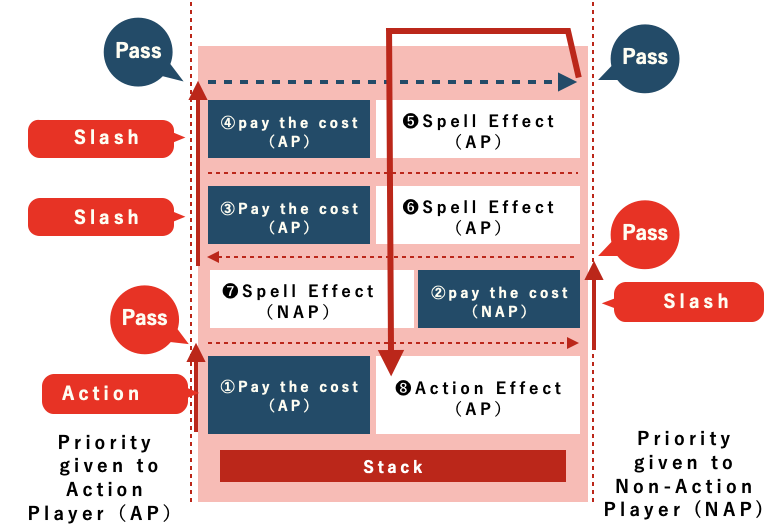
Spells or activated abilities used in each step are generally placed on the stack, and effects are resolved in the order they were placed, with the most recent effect resolving first.
Stack and Priority
💡
Effects that can be placed on the stack:
① Slash Spell effects
② Slash ability effects
③ Trigger effects
💡
When Priority Occurs
Typically, "at the beginning of each step" (after processing step-triggered actions) and "when any effect triggers," the active player gains priority.
Afterward, the active player passes priority to the non-active player.
Once all players pass priority, the effects on the stack are processed from the top down.
After each effect is resolved, the active player gains priority again.
💡
Stack Processing Flow
Once all players have passed, the effects on the stack are executed from the top.
Actions that Do Not Go on the Stack
Effects that do not go on the stack are characterized by not being interrupted. The opponent does not get an opportunity to respond to these effects, and the results are applied immediately.
💡
Game Rule Processing
A player whose life is 0 or less loses the game.
A player with no portals on any of their lands loses the game.
Spils with power 0 or less are placed in the drop.
Tokens outside the field are destroyed.
During the Draw Step, each player draws 1 card.
💡
Replacement Effects / Marker Effects
Replacement effects occur when a specific event happens and replace that event with another. These effects do not go on the stack and are applied immediately.
Marker effects are a type of replacement effect.
Example: "Instead of dealing 1 damage, double the damage."
💡
VAZ Abilities
VAZ abilities (effects that generate VAZ directly through skills or ability activation) do not go on the stack.
This means that opponents cannot interfere with the process of generating VAZ to pay for spell costs.
However, effects like "Generate 2 VAZ+1 counters" do go on the stack.
💡
Continuous Effects
Continuous effects do not go on the stack and are always applied.
Example: "All your units get +1 to their base power."
8.3 Triggered Abilities
When effects are triggered simultaneously, a "stack" is created for each effect and placed in the "stack layer." Then, the effects are processed one by one in the order of their execution priority, starting with the earliest event.
💡
Resolve Portal Effects First
❶First, resolve Portal effects.
If multiple Portal effects are triggered at the same time,
resolve them starting with the Portal to the active player’s right,
then continue clockwise.
❷Placing Triggered Effects on the Stack
After that, each player places their triggered effects on the stack
in the following order:
The active player places all triggered effects they control
onto the stack in any order they choose.
Next, the non-active player places all triggered effects they control
onto the stack in any order they choose.
Once all triggered effects have been placed on the stack,
they resolve in order from the top of the stack.
9.Keyword List
Keyword Ability List
#Overstrike
Deal any excess combat damage to the attack target.
#Menace
Can only be blocked by two or more units.
#Lethal
Any opponent’s Spil dealt combat damage by this is Dropped.
#Vigilance
This unit does not become Synced when it declares an attack.
#Atk+N
When this declares an attack, it gets +N Power until end of turn.
#Block+N
When this is declared as a blocker, it gets +N Power until end of turn.
#Armor+N
Damage dealt to this is reduced by N.
#Curse+N
Increase damage taken by a unit by N.
#Haste
This unit can declare an attack in the turn it is summoned.
#Flash
This unit can be summoned during the slash timing.
#MoveN
Can move up to N spaces when shifting.
#Leap
Can leap over adjacent units when shifting.
#TeleportN
Can shift to an empty space within a range of N.
#Veil
Can't be the target of opponent's spells or abilities.
#Barrier
Cannot take damage from non-combat sources.
#Flying
This unit can shift to any empty space on the land it is located.
#Stealth
This can't be chosen as an attack target.
10. FAQ and Glossary
This chapter provides answers to common gameplay questions and definitions of frequently used game terms.
If an answer in this chapter conflicts with the text of a card, follow the Golden Rule of VARZ TCG.
10.1 Frequently Asked Questions
GENERAL RULES
CARDS AND ABILITIES
DROPPED ABILITIES
LEGENDARY RULE
TIMING AND THE STACK
POSITIONING AND MOVEMENT
COMBAT
PORTALS
MULTIPLAYER
10.2 Glossary
The Glossary explains general game terms.
Keyword abilities such as Overstrike, Guard, Flying, Teleport, and other named abilities are explained separately in Chapter 9.
Ability
Rules text that creates or modifies an effect.
Abilities may be activated, triggered, continuous, or keyword abilities.
Abyss
A public zone where discarded cards, resolved cards, Dropped Spils, and other cards specified by rules or effects are placed.
Cards in the Abyss are not on the Battlefield.
Active Player
The player whose turn is currently taking place.
Adjacent
Occupying Hexes that share an edge.
Hexes that touch only at a corner are not adjacent.
Attack
A Main Phase action in which an eligible unit declares an attack against a legal attack target.
Attack Target
The card or player chosen as the target of an attack when that attack is declared.
Banished
A card state or zone change created by a rule or effect.
Being Banished is different from being Dropped or destroyed.
Base Power
The Power value printed on a unit before modifiers and damage are applied.
Battlefield
The Hex-based play area where Heroes, Spils, and Portals participate in the game.
The Battlefield does not include the Holder.
Block
The act of assigning an eligible unit to defend the target of an attack.
Card Text
The rules and abilities printed on, or officially assigned to, a card.
Under the Golden Rule, card text may override a general rule for a specific situation.
Cast
To play a card by declaring it, choosing any required options or targets, paying its cost, and placing it on the Stack.
Combat
The procedure that begins when an attack is declared.
Combat includes attack declaration, block declaration, and the Damage Step.
Combat Damage
Damage dealt by an attacking or blocking unit during the Damage Step.
Damage dealt by an ability is not combat damage unless the effect specifically states otherwise.
Controller
The player currently controlling a card, spell, or ability.
A card's controller may be different from its owner.
Cost
A payment or action required to cast a card or activate an ability.
A cost must be paid before the card or ability is placed on the Stack.
Counter
A marker placed on a card that represents a persistent numerical or rules change.
Counters remain until removed by a rule or effect, or until the card leaves the relevant zone.
Current Power
A unit's Power after all applicable modifiers and damage have been applied.
Current Power can be less than 0.
Damage
A numerical amount dealt to a Hero, Spil, Portal, or another valid game object.
Deck
A face-down collection of cards prepared before the game.
VARZ uses separate decks for different card types, including the Spell Deck, Skill Deck, and Portal Deck.
Destroy / Destroyed
To destroy a valid card or game object and move it to the zone specified by the rules.
A destroyed Portal is placed into its owner's Ruins.
Being destroyed is different from being Dropped.
Discard
To move a card from a player's hand to its owner's Abyss.
Discarding a card is not the same as Dropping a unit.
Drop / Dropped
To move a unit from the Battlefield to its owner's Abyss as the result of damage, a card effect, or a game rule that specifically Drops it.
A card moved to the Abyss from another zone was not Dropped unless the rule or effect specifically says so.
Effect
The result produced when a spell or ability resolves.
Eliminated Player
A player who has lost and has been removed from an ongoing multiplayer game.
All spells and abilities controlled by an eliminated player are removed from the Stack without resolving.
End Phase
The final phase of a player's turn.
End Phase abilities and end-of-turn procedures are handled during this phase.
Enter the Battlefield
To be placed onto the Battlefield from another zone.
A card that Shifts from one Hex to another does not enter the Battlefield again.
Field
The collective term for the Battlefield and the Holder.
An effect that refers to the Field may refer to cards or areas in either part of the Field, as specified by that effect.
Hero
The card representing a player's main character.
A Hero has Life, a color, abilities, and may be able to V-Sync.
A Hero is a unit.
Hex
A single six-sided space on the Battlefield.
Units occupy Hexes, and range is measured across Hexes.
Holder
The part of the Field outside the Battlefield used to hold decks, cards, counters, and other components specified during game setup.
Initial Reveal
The revealing of the first Portal in each Portal Deck during game setup.
On Reveal abilities do not trigger from an Initial Reveal.
Keyword Ability
A standardized ability represented by a keyword.
The rules for keyword abilities are listed in Chapter 9.
Land
A section of the Battlefield associated with a Portal Deck.
Effects may refer to units, players, or Portals on the same Land.
Last Known Information
Information about a card immediately before it left the zone it was in.
If a Dropped ability needs to know its source's previous position, range, adjacency, Land, controller, Power, or other Battlefield information, use that card's last known information.
Legal
Meeting every rule and requirement necessary for an action, target, Hex, card, or choice.
Legendary Rule
A game rule that restricts a player from controlling multiple prohibited copies of the same Legendary card.
A card placed into the Abyss by the Legendary Rule is not considered Dropped, destroyed, or Banished.
Life
The value representing a player's remaining endurance.
A player loses when their Life reaches the loss condition described in Chapter 1.
Main Phase
The phase in which the active player may cast cards, Shift units, activate abilities, declare attacks, and perform other legal Main Phase actions.
Marker
A physical object used to represent damage, status, temporary information, or another game value.
A marker is not a card.
Non-Active Player
A player whose turn is not currently taking place.
On Enter
A triggered ability that triggers when its source enters the Battlefield.
Shifting does not trigger an On Enter ability.
On Reveal
A triggered ability that triggers when its source is revealed in the manner specified by the rules.
The initial Portals revealed during game setup do not trigger On Reveal abilities.
Original Attack Target
The card or player chosen as the attack target when an attack is declared.
The original attack target does not change if the attacking unit later changes position.
Owner
The player whose deck the card originally came from.
Ownership does not change during the game.
Portal
A card placed in a Portal Deck.
Portals have Shield Life and may have abilities that affect their Land.
A Portal is not a unit.
Portal Deck
A face-down stack of Portal cards assigned to a Land.
When the active Portal is destroyed, the next Portal is revealed after the Stack becomes empty.
Power
The value used to represent a unit's strength.
Use current Power after applying all relevant modifiers and damage.
Power can be less than 0.
Priority
Permission to cast a card, activate an ability, perform another permitted action, or pass.
The Stack resolves according to the priority and Slash Timing rules.
Range
The maximum distance across Hexes at which an attack, ability, or effect can reach.
Reveal
To turn a hidden card face up and make its identity public.
Revealing a card does not change its zone unless a rule or effect says otherwise.
Ruins
The public zone where destroyed Portals are placed.
Shift
The general term for changing a unit's position from one Hex to another.
Move, Flying, Teleport, and similar movement methods are forms of Shift.
Shield Life
The durability value of a Portal.
A Portal is destroyed when it has taken enough damage according to the Portal damage rules.
Skill Card
A card belonging to a player's Skill Deck.
Skill Cards support the Hero and may contribute to the Hero's V-Sync condition.
Slash Timing
A response window during which a player may cast or activate a card or ability with the appropriate Slash permission.
Slash Timing is created by an applicable spell, ability, or rule.
A Slash Timing window does not occur merely because a phase has begun.
Spell Card
A card belonging to a player's Spell Deck.
A Spell Card may summon a Spil or create another effect, depending on its type and text.
Spil
A supernatural unit summoned onto the Battlefield.
Spils can Shift, attack, block, use abilities, take damage, and be Dropped.
Stack
The ordered area where spells and abilities wait to resolve.
The most recently added spell or ability resolves first.
Start Hex
The designated Hex where a Hero begins the game.
Start Phase
The first phase of a player's turn.
Start Phase procedures and triggered abilities are handled during this phase.
If no ability triggers and the Stack remains empty, no Slash Timing window occurs.
Summon
To place a Spil onto a legal Hex on the Battlefield.
A summoned Spil enters the Battlefield and may trigger On Enter abilities.
Sync
To change an Unsynced card into the Synced state.
Syncing may be required as a cost or as the result of performing an action.
Sync Icon
An icon indicating that the source must Sync as part of activating the ability.
A Spil summoned during the current turn cannot activate an ability with a Sync icon unless a rule or effect specifically allows it.
Synced
A card state showing that the card has been used or committed.
A Synced card cannot be used to pay another Sync cost until it becomes Unsynced.
Target
A card, player, Hex, or other game object specifically chosen by an attack, card, ability, or rule.
A target must satisfy all applicable targeting requirements.
Triggered Ability
An ability that automatically triggers when its stated event or condition occurs.
Triggered abilities are placed on the Stack according to the timing rules.
Turn
The complete sequence of one player's Start Phase, Main Phase, and End Phase.
Unit
A Hero or Spil on the Battlefield.
Portals are not units.
Unsynced
A card state showing that the card is ready to be used.
An Unsynced card may become Synced to pay a cost or perform an action when permitted.
VAZ
The colored resource used to pay costs in VARZ.
Colored costs must be paid using the required colors of VAZ unless a rule or effect says otherwise.
V-Sync
The process by which a Hero changes to its evolved form after fulfilling its V-Sync condition.
V-Syncing is not summoning and does not cause the Hero to enter the Battlefield again.
Zone
A defined game area in which cards can exist.
Zones include the hand, decks, Battlefield, Holder, Abyss, and Ruins.